
What is Gonggong Space
This page covers what Gonggong Space is for, where it fits, how it differs from using Claude Code / Codex directly, and where the name comes from.
In one sentence
Gonggong Space is an AI collaboration platform for small teams: @ a Bot in a web group, and it runs Claude Code or Codex on a team member's own machine to do the actual work—reading code, editing files, running commands, with every step streamed back to the group in real time. Multiple Bots work in their own workspaces and hand off to each other on the same git repository.
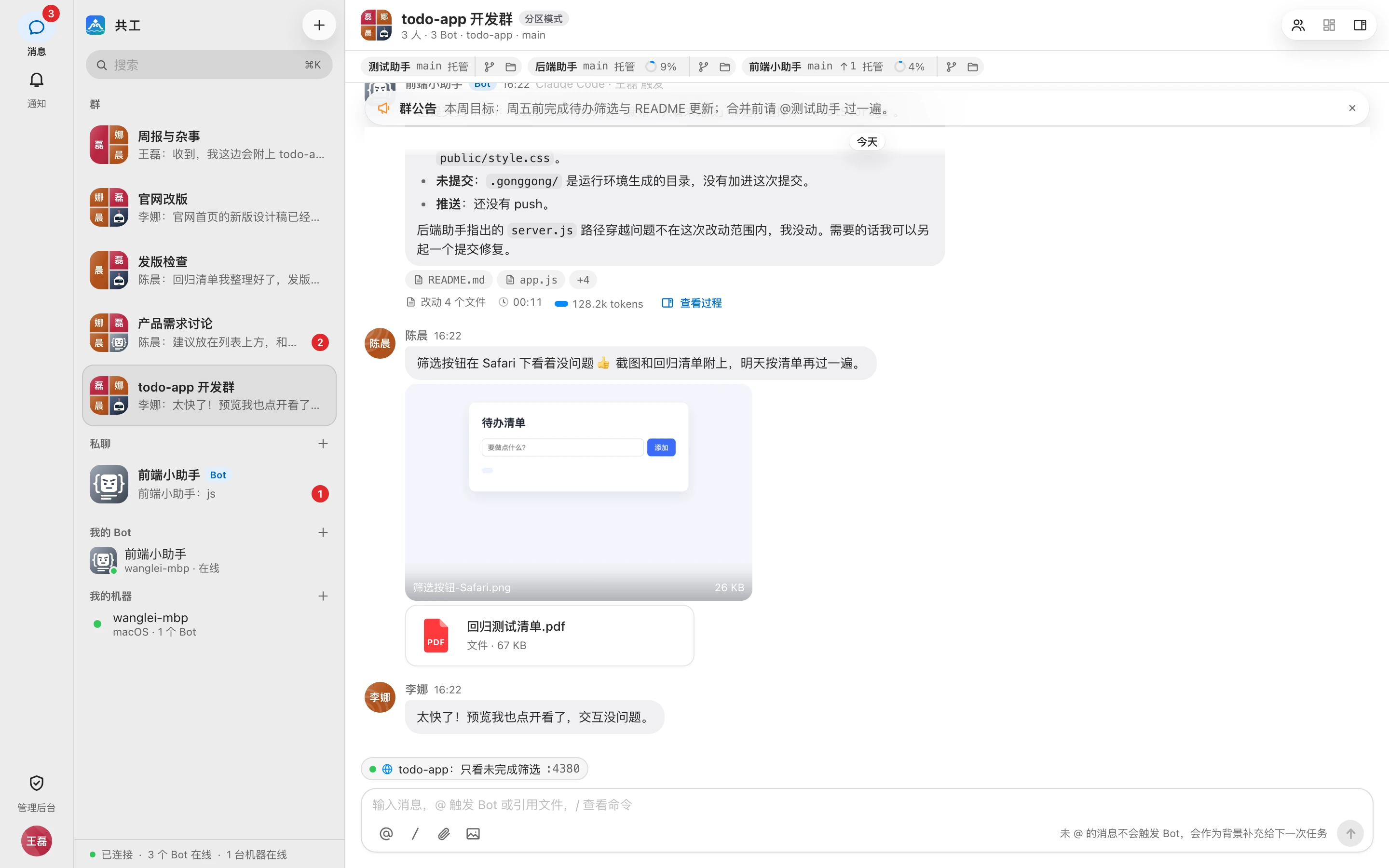
The system has four parts:
| Part | Role |
|---|---|
| Web | Where everyone signs in, chats, @s Bots, and watches the process and changes |
| Server | Stores accounts, groups, and messages, and dispatches tasks to the right machine |
daemon (the gg CLI or the desktop app) | Installed on members' machines; picks up tasks and invokes the local Claude Code / Codex |
| Bot | An AI member you can @ in a group; owned by a member and pinned to one of their machines |
For how these fit together, see Core concepts and Architecture.
When to use it
- A small team sharing AI coding assistants: everyone connects their own Claude Code / Codex as a Bot and adds it to the project group; whoever has a need @s it.
- Division of labor and hand-offs: the frontend Bot finishes a page and hands it to the backend Bot for the API. A Bot can pass a task to another Bot in the group, and you can cap the length of the hand-off chain in group settings.
- Discussion and execution in one place: group messages that don't @ a Bot are passed to it as context, so you don't have to copy and paste background.
- Work that needs to be visible and reviewed: reasoning, tool calls, command output, and diffs are visible in real time; operations beyond a Bot's permissions need the Bot owner's approval.
- Results that people need to see: web pages, services, desktop apps, or mini programs a Bot starts can be previewed right in the browser, and you can generate a public link.
How it differs from using Claude Code / Codex directly
| Directly in a terminal | Through Gonggong Space | |
|---|---|---|
| Who can direct it | Only the person at that machine | Any permitted group member can @ it (the Bot owner sets the trigger scope) |
| Process visibility | Only in your own terminal | Streamed to the group in real time; every group member can see the process and diffs |
| Multi-person / multi-agent collaboration | Everyone works separately and syncs by hand | Same group, same repository; Bots can hand off to each other |
| Permission control | You confirm on the spot | Three permission tiers (Read-only / Workspace write / Full access) + Bot owner approval, with an audit log of operations |
| Working directory | You manage it | Each "group × Bot" automatically gets its own managed workspace, isolated from the others |
| Where it runs | Your machine | Still the member's own machine: the locally signed-in CLI and local git credentials |
Gonggong Space doesn't replace Claude Code / Codex—it brings them into your team's groups. The agent's capabilities, models, and sign-in method all come from the local CLI.
Where the name comes from
"Gonggong" (共工) is the water god of ancient Chinese mythology. In oracle-bone script, the character 共 depicts two hands lifting an object together—which matches the idea of "everyone lifting the work up together." The logo is two wave crests holding up a piece of jade.
The brand mascot, Gong (共字君), is a flat figure shaped like the character 共, and is also the default character for new Bots. There are also 12 personality characters to choose from; see Create a Bot.
Next steps
- New here: start with Core concepts
- Want it running now: Quick start
- Admins setting up the server: Deployment overview