
Audit log
This page explains how to search the 「审计记录」 (Audit log) page and which events the system records.
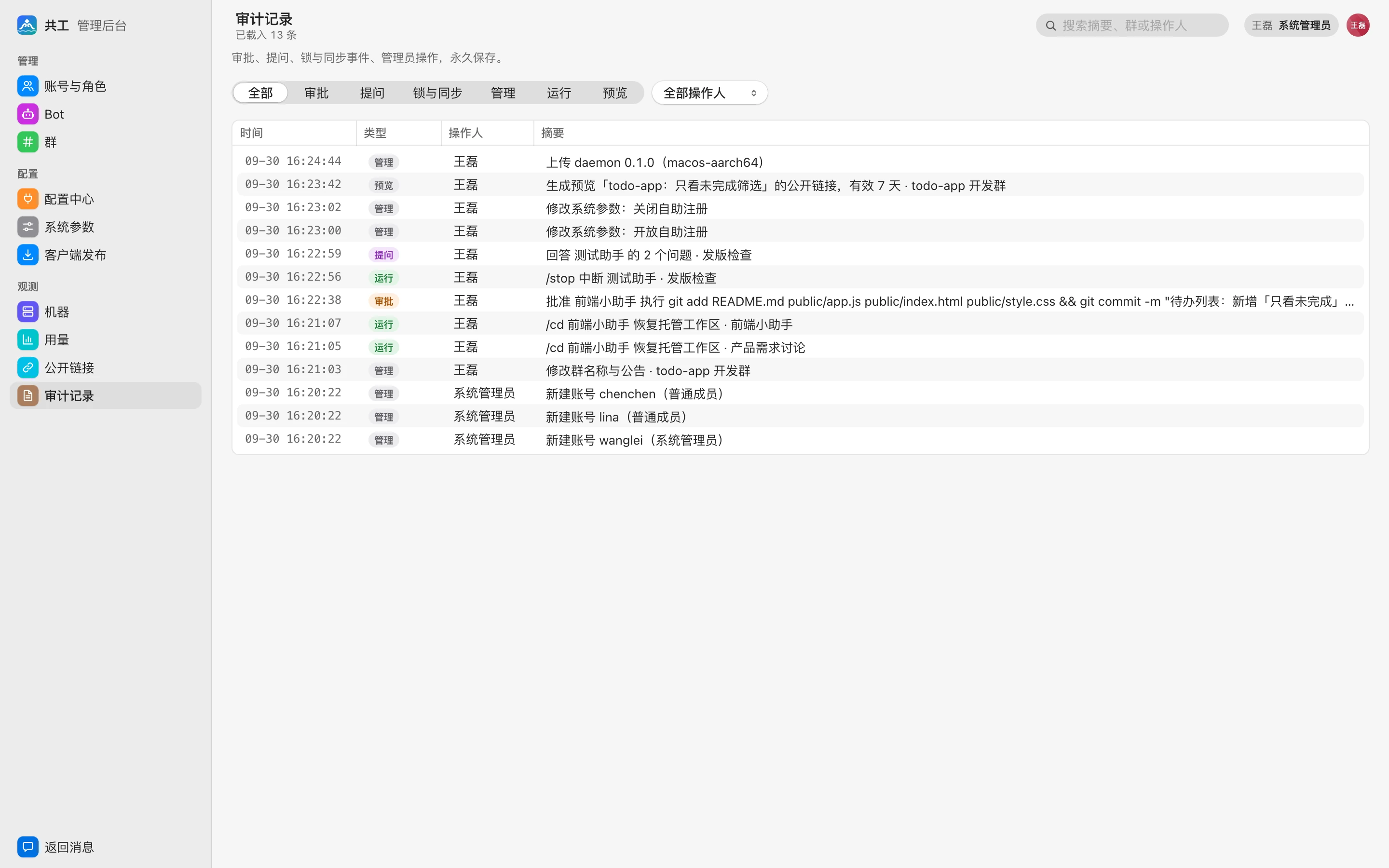
View and filter
Records are listed newest first and kept permanently; cleanup parameters such as 「完整运行过程保留」 (Keep full run details for) don't affect them.
- The segmented control at the top filters by type: 全部 (All) / 审批 (Approvals) / 提问 (Question) / 同步 (Sync) / 管理 (Admin) / 运行 (Runs) / 预览 (Preview). Records of other types, such as terminal, machine, and scheduled task, appear only under 「全部」 (All).
- The 「全部操作人」 (All actors) dropdown filters by actor; records generated automatically by the system (such as approval timeouts or scheduled tasks turned off automatically) show 「系统」 (System) as the actor.
- The team filter in the toolbar shows only one team's records; it defaults to 「全部团队」 (All teams).
- The search box in the top-right corner searches summaries, group names, and actors.
The page loads 50 records at a time; the toolbar shows 「已载入 N 条」 ("N loaded"), and 「加载更多」 (Load more) at the bottom goes further back. The actor filter and search apply only to records already loaded, so to find older events, load a few more pages first, or narrow things down with the type and team filters.
The table columns are time, type, actor, and summary. Double-click a row to open its details, which show the full summary, the group, and the raw fields.
Team admins can also see their team's records under 「团队设置 → 审计」 (Team settings → Audit).
Which events are recorded
Approvals
- Approving or rejecting a Bot's permission request, and automatic rejection on timeout.
- Approval requests becoming void (after /stop, a terminated relay chain, or the run having ended).
Only the Bot owner can handle permission requests; see Approvals and questions.
Questions
- Answering a Bot's question, a question timing out unanswered, a question becoming void.
Runs
/stopinterrupting a run, terminating a whole relay chain.- Keeping or discarding the changes of an interrupted turn, rerunning.
/cdswitching or restoring a Bot's working directory,/newstarting a new session.- Interrupting a Bot's background task.
- A Bot reading content from another group.
Admin
| Object | Example events |
|---|---|
| Account | Create, change name or role, reset password, disable, enable, self sign-up, link or unlink Feishu |
| Team | Create, archive, restore, set owner, modify team, accept invite |
| Bot | Create / modify / delete a Bot for someone else, confirm a Bot, change the approval setting, new rules from 「始终允许」 ("Always allow"), 「本次运行免审批」 (No approvals this run), set a Bot's provider, approve a sharing request |
| Machine | Revoke a machine, transfer it to a new owner, confirm a connection on the web, upgrade the daemon from the web, install or upgrade Agent tools, change mirror sources and Agent settings, save / delete / import providers |
| Group | Change group name and notice, delete the notice, change group-level parameters, set or unset group admins, invite or remove members, add or remove Bots, bind or change the repository, additional repositories, toggle sync, dissolve the group |
| Git | Members submitting Git operation requests, owners approving or rejecting them, Git write operations being executed |
| Configuration | Adding, removing, and changing MCP servers, Skills, plugins, and secrets at the platform / team / group layer; enabling plugins in a group; changing system parameters (each item's old and new value is recorded) |
| Market | Publishing, reviewing, banning, and other market operations |
| Feishu | Saving or removing Feishu apps; binding, unbinding, and creating Feishu chats; syncing chat members |
| Client releases | Uploading or removing daemon, gg-cast, and desktop files; editing release notes; script publishing |
Previews
- Generating a public link (including how many days it's valid), revoking it, changing its expiry.
- Visiting a preview through a public link.
- Sharing artifacts such as prototype canvases.
Other
- Terminal: the machine owner creating, connecting to, disconnecting from, and ending terminal sessions, etc.
- Machine: deleting or cleaning up workspaces on a machine from the web.
- Scheduled tasks: creation, deletion, automatic disabling.
TIP
The 「同步」 (Sync) type currently has no records.
What the audit log contains, and what it doesn't
- The audit log records only "who did what, and when" plus the necessary context (such as account name, Bot name, repository URL). It doesn't record passwords, secret values, or other sensitive content.
- Command titles in approval records are redacted before they're stored; see Security model.