
Client releases
This page explains how to upload new daemon and gg-cast versions on the 「客户端发布」 (Client releases) page, how file names determine platform and version, and how member machines upgrade automatically.
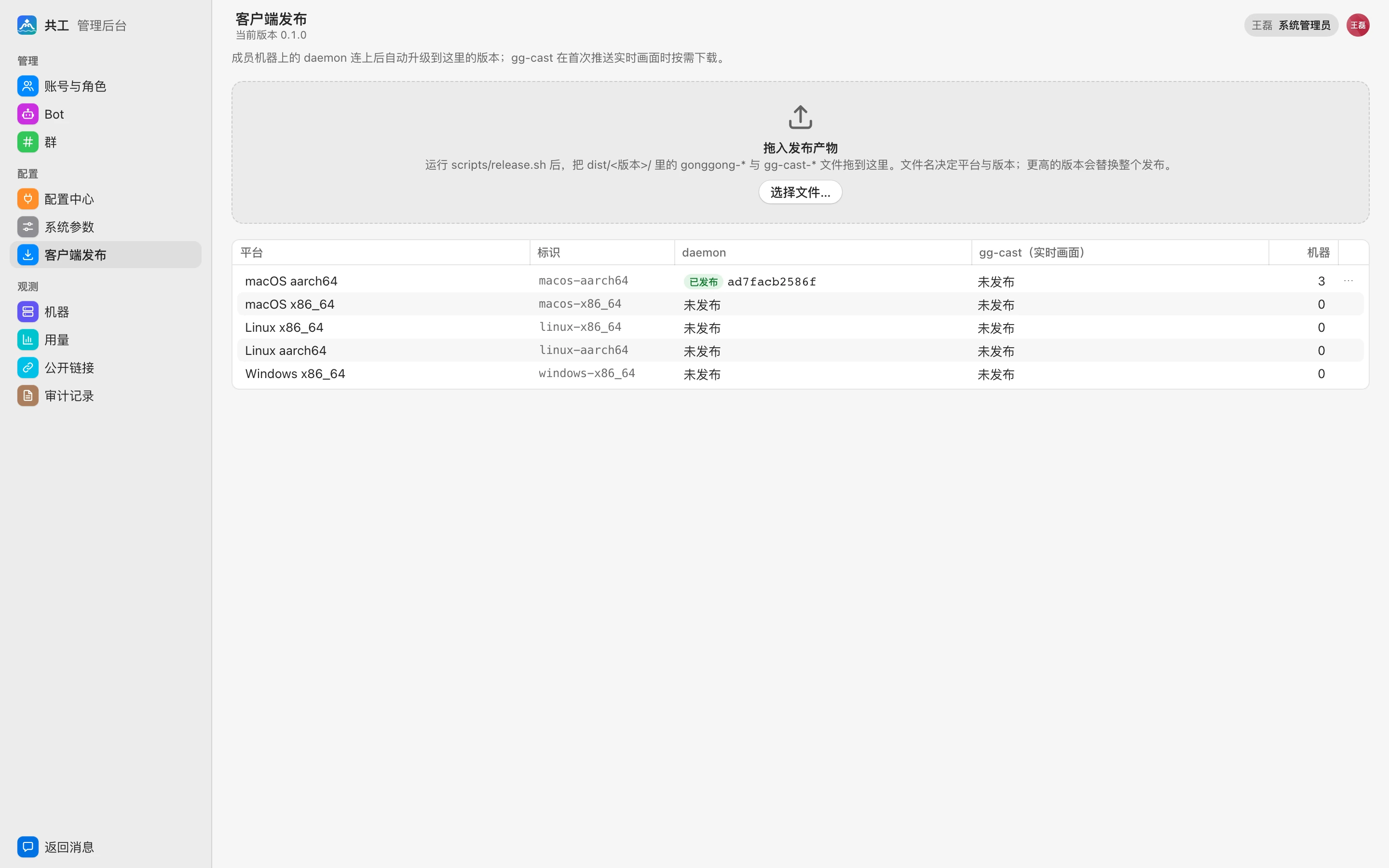
What gets released here
| Artifact | Example file name | Purpose |
|---|---|---|
| daemon | gonggong-0.2.0-macos-aarch64 | The gg command-line program on member machines. Online daemons upgrade automatically to the version here once they connect to the server |
| gg-cast | gg-cast-0.2.0-windows-x86_64.exe | Helper program for pushing 「实时画面」 (live view) previews. The daemon downloads it on demand the first time it pushes a live view |
Artifacts are produced by running scripts/release.sh on a build machine and placed in dist/<version>/; see Upgrade and release clients.
TIP
The macOS desktop app's .dmg can't be uploaded here. The desktop app bundles the daemon and gg-cast, but its bundled daemon doesn't use this auto-upgrade; new desktop versions must be downloaded and installed again. See Desktop app.
Upload
- On the build machine, run
bash scripts/release.sh(without--publish). - Open the 「客户端发布」 (Client releases) page and drag the
gonggong-*andgg-cast-*files fromdist/<version>/into the 「拖入发布产物」 (Drop release artifacts) area (you can drag several at once). - Each file shows its upload progress. When done, the matching platform in the table below changes to 「已发布」 (Published).
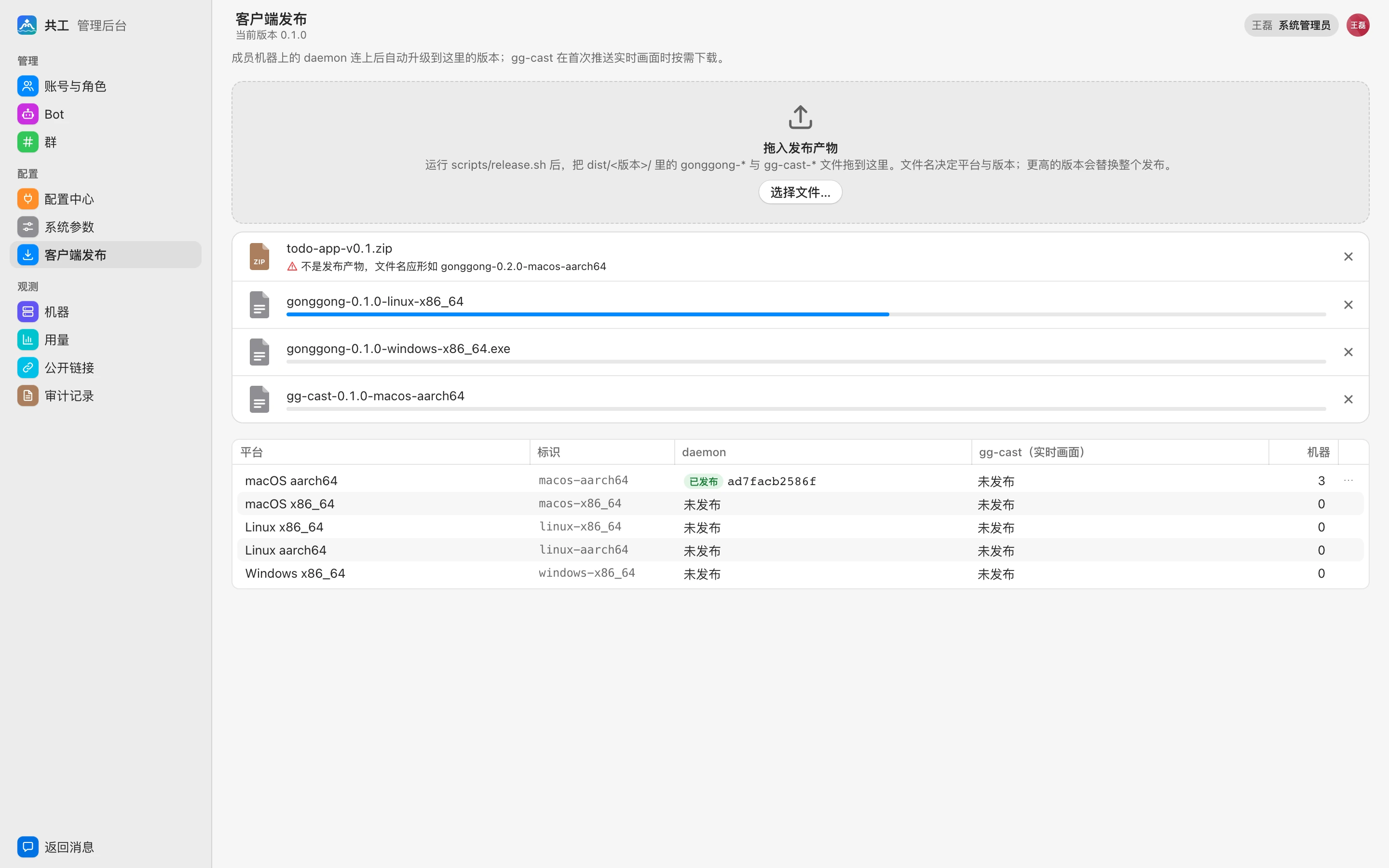
The server computes the sha256 while receiving the file, stores it under downloads/ in the data directory ($GONGGONG_DATA_DIR/downloads), and serves it at /downloads/<file name>.
File name rules
The file name determines the artifact type, version, and platform, in this format:
gonggong-<版本>-<平台>[.exe]
gg-cast-<版本>-<平台>[.exe](<版本> = version, <平台> = platform.)
- Version: three numeric parts, such as
0.2.0. - Platform:
macos-aarch64,macos-x86_64,linux-x86_64,linux-aarch64,windows-x86_64. - Only Windows files have
.exe; other platforms must not.
Files that don't match the rules (including SHA256SUMS, manifest.json, and .dmg) are rejected in the browser with 「不是发布产物,文件名应形如 gonggong-0.2.0-macos-aarch64」 ("Not a release artifact; the file name should look like gonggong-0.2.0-macos-aarch64"). Don't rename files; drag in the original artifacts from release.sh.
Version rules
The server keeps only one release version at a time:
| Version of the uploaded file | Result |
|---|---|
| Same as the current version | Merged per platform: adds or replaces that platform's file; other platforms are unchanged |
| Higher than the current version | Starts a new release, replaces the entire release record, and deletes the old version's files hosted on this server |
| Lower than the current version | Upload rejected |
So when you release a new version, upload the files for all platforms; any platform you skip is 「未发布」 (Not published) in the new release.
A single file can't exceed 300 MB. If you run a reverse proxy in front, raise its request body limit to at least 300 MB; see Reverse proxy.
Platform table
The toolbar shows 「当前版本 x.y.z」 (Current version x.y.z) or 「尚未发布」 (Not yet released). The table has one row per platform:
| Column | Description |
|---|---|
| 平台 / 标识 (Platform / identifier) | Such as 「macOS aarch64」 / macos-aarch64 |
| daemon | 「已发布」 (Published) with the first 12 characters of the sha256; otherwise 「未发布」 (Not published). Highlighted in a warning color if the platform has machines but nothing is published |
| gg-cast(实时画面) (gg-cast, live view) | Same as above |
| 机器 (Machines) | Number of machines on that platform |
Each row's menu offers 「移除 daemon…」 (Remove daemon…) or 「移除 gg-cast…」 (Remove gg-cast…):
- Removing the daemon: machines on that platform stop auto-upgrading until you upload again.
- Removing gg-cast: machines on that platform can't push live views until you upload again.
Uploads and removals are both written to the audit log.
How auto-upgrade works
- When the daemon on a member machine (
gg run) connects to the server, it reports its OS, architecture, and version. - If the server's released version is newer and there's a daemon file for that platform, the server sends the download URL and sha256 to the daemon. The daemon never downgrades.
- The daemon downloads the file in the background and verifies the sha256. A version that fails verification is rejected and not retried for the rest of that run.
- Once the machine has no runs in progress, the daemon replaces its own executable and restarts, coming back online with the new version.
- If the daemon's protocol version is too old and the server refuses its connection, it downloads the upgrade immediately.
Write permission required
The daemon replaces its own executable, so gg should live in a directory the member can write to (such as ~/.local/bin), not somewhere like /usr/local/bin that needs sudo. See Installation.
Members can turn off auto-upgrade by setting the environment variable GONGGONG_NO_AUTO_UPGRADE=1, or by turning off 「自动升级」 (Auto-upgrade) in the desktop app's 「设置」 (Settings) (this is written to the local settings and also applies to gg on the same machine). See Command reference.
Alternative: publish with a script
If you can run scripts on the server, you can also build and publish in one step with scripts/release.sh --publish <server URL>; see Upgrade and release clients.