
System parameters
This page lists every item on the 「系统参数」 (System parameters) page: what it means, its default, and its allowed range.
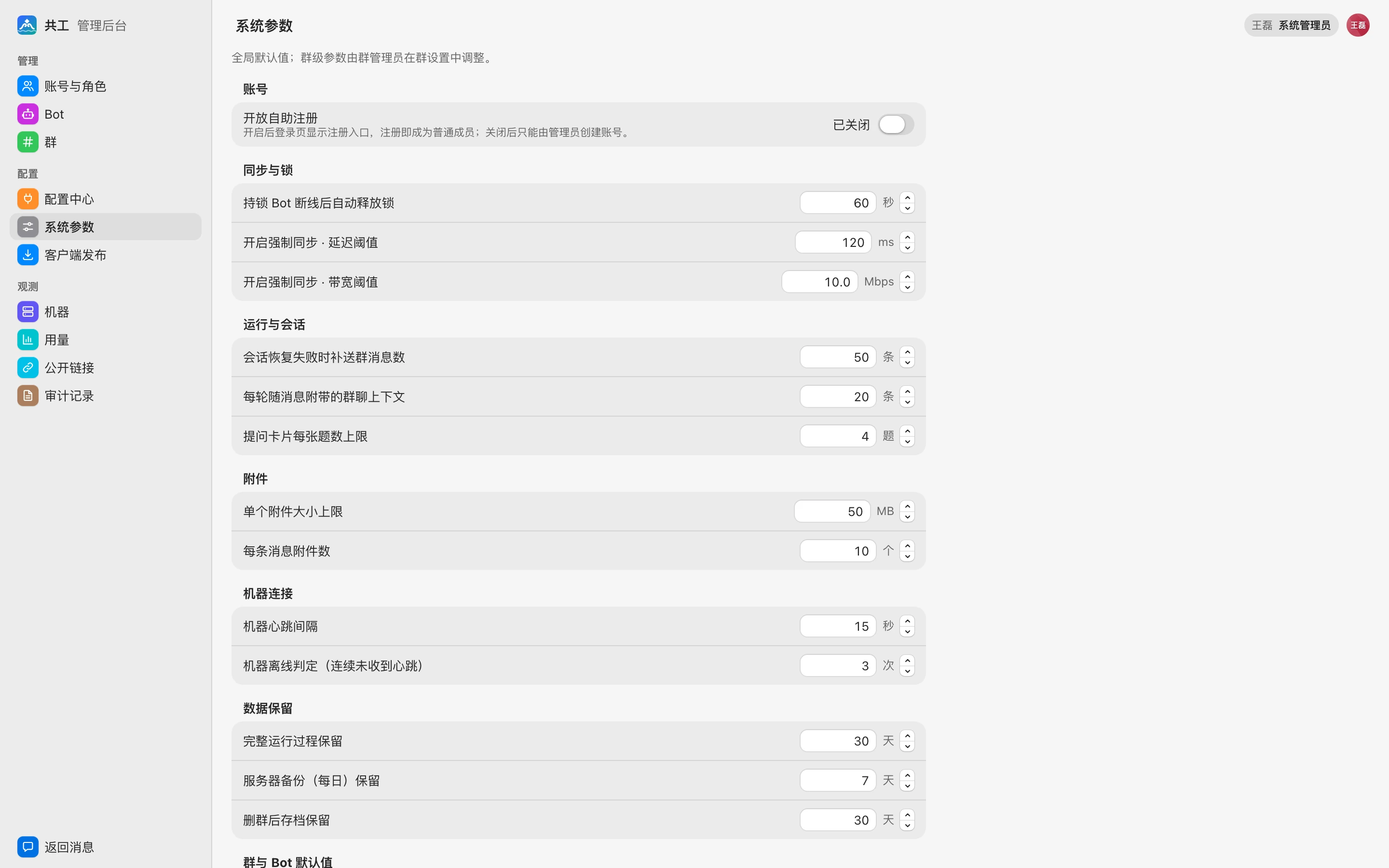
How it works
- Parameters are arranged in groups. Each item has a numeric stepper on the right, with the unit shown after it.
- Once you change an item, a dot appears in front of it and a save bar reading 「已修改 N 项」 (N items modified) appears at the bottom of the page. Click 「保存」 (Save) to submit or 「放弃」 (Discard) to revert. If you leave the page without saving, the browser warns you.
- Saved values apply to new requests immediately (except 「机器心跳间隔」 (Machine heartbeat interval); see below) and are written to the audit log with each item's old and new value.
- Values outside the allowed range are rejected on save.
The three items marked 「群默认」 (group default) are global defaults for group-level parameters: group admins can override them for their own group in group settings, and groups that haven't overridden them use the values here.
Accounts
| Parameter | Default | Description |
|---|---|---|
| 开放自助注册 (Open self-registration) | Off | When on, the sign-in page shows a registration entry and anyone who registers becomes a member; when off, only admins can create accounts. The toggle takes effect immediately, with no need to click Save. At most 5 accounts can be registered per IP per hour |
Sync and locks
| Parameter | Default | Range | Description |
|---|---|---|---|
| 持锁 Bot 断线后自动释放锁 (Auto-release lock after lock-holding Bot disconnects) | 60 s | 1–3600 | Reserved; has no effect in the current version |
| 开启强制同步 · 延迟阈值 (Enable forced sync · latency threshold) | 120 ms | 1–10000 | Currently used only on the Machines page: machines with latency above this value are flagged red |
| 开启强制同步 · 带宽阈值 (Enable forced sync · bandwidth threshold) | 10 Mbps | 0.1–10000 | Currently used only on the Machines page: machines with bandwidth below this value are flagged red |
Runs and sessions
| Parameter | Default | Range | Description |
|---|---|---|---|
| 会话恢复失败时补送群消息数 (Group messages to resend when session resume fails) | 50 messages | 1–500 | When a Bot resumes a previous session, the most recent group messages are prepared alongside it and sent to the new session if the old one can't be resumed; the actual count doesn't exceed the next item |
| 每轮随消息附带的群聊上下文 (Group chat context attached per turn) | 20 messages | 1–200 | The maximum number of group messages sent to the Bot with the @ message on each run (new messages since that Bot's last run); the Bot can read older messages itself via built-in tools |
| 提问卡片每张题数上限 (Max questions per question card) | 4 questions | 1–4 | Has no effect in the current version; each question card is fixed at a maximum of 4 questions |
Attachments
| Parameter | Default | Range | Description |
|---|---|---|---|
| 单个附件大小上限 (Max size per attachment) | 50 MB | 1–50 | Maximum size of a single uploaded attachment |
| 每条消息附件数 (Attachments per message) | 10 | 1–10 | Maximum number of attachments in one message |
TIP
If you raise the attachment limits, also check the request body size limit of your reverse proxy; see Reverse proxy.
Machine connections
| Parameter | Default | Range | Description |
|---|---|---|---|
| 机器心跳间隔 (Machine heartbeat interval) | 15 s | 5–120 | How often the daemon sends a heartbeat to the server. Read at server startup; you must restart the server for changes to take effect. The environment variable GONGGONG_HEARTBEAT_SEC takes precedence over this parameter |
| 机器离线判定(连续未收到心跳) (Offline threshold — consecutive missed heartbeats) | 3 | 2–10 | If no heartbeat arrives for this many consecutive heartbeat intervals, the machine is considered offline |
Data retention
| Parameter | Default | Range | Description |
|---|---|---|---|
| 完整运行过程保留 (Full run process retention) | 30 days | 1–3650 | Once a run has been finished for more than this many days, the turn's full process (thinking, tool calls, output) and diff are deleted; the summary on the run card is kept. The server cleans up once an hour |
| 服务器备份(每日)保留 (Server backup retention — daily) | 7 days | 1–365 | Currently has no effect: the backup script always keeps the most recent 7 backups; see Backup and restore |
| 删群后存档保留 (Archive retention after group deletion) | 30 days | 1–365 | How many days a group's archive is kept after the group is disbanded; the Groups page uses this to show 「N 天后清除」 (purged in N days) |
Group and Bot defaults
| Parameter | Default | Range | Description |
|---|---|---|---|
| 权限审批等待(分区模式)· 群默认 (Permission approval wait — partition mode · group default) | 30 min | 1–1440 | How long to wait for the Bot owner to approve after a Bot raises a permission request; on timeout it is rejected automatically. See Approvals and questions |
| 接力链长上限 · 群默认 (Max relay chain length · group default) | 3 hops | 1–10 | When a Bot @-mentions another Bot in its reply to hand off, the maximum number of times a single relay chain can be passed on |
| Bot 离线时请求等待上线 · 群默认 (Wait for Bot to come online when offline · group default) | 30 min | 1–1440 | When a Bot's machine is offline, how long a request stays queued waiting for the machine to come online; on timeout the request is discarded and the requester is notified |
| Bot 并发上限 · 新建默认 (Bot concurrency limit · default for new Bots) | 2 | 1–10 | Initial value of 「并发上限」 (Concurrency limit) when creating a new Bot; existing Bots aren't affected |
Other
Parameters not in the groups above appear in the 「其他」 (Other) group:
| Parameter | Default | Range | Description |
|---|---|---|---|
| 预览无人访问后自动关闭 (Auto-close preview after no visits) | 24 hours | 1–720 | If nobody opens a preview for this long, it closes automatically, and managed services no longer used by any other preview are stopped. See Result previews |
| 预览公开链接最长有效期 (Max validity of preview public links) | 30 days | 1–365 | The longest validity period you can choose when creating a public link; see Public sharing |