
Public sharing
This page covers how to generate a public link for a web preview published by a Bot, so outside people without an account can access it, along with validity periods, revoking, and access auditing.
Generate a public link
Only the Bot owner or a group admin can generate one, and only web previews (web page / service, static page) are supported. For previews themselves, see Previews.
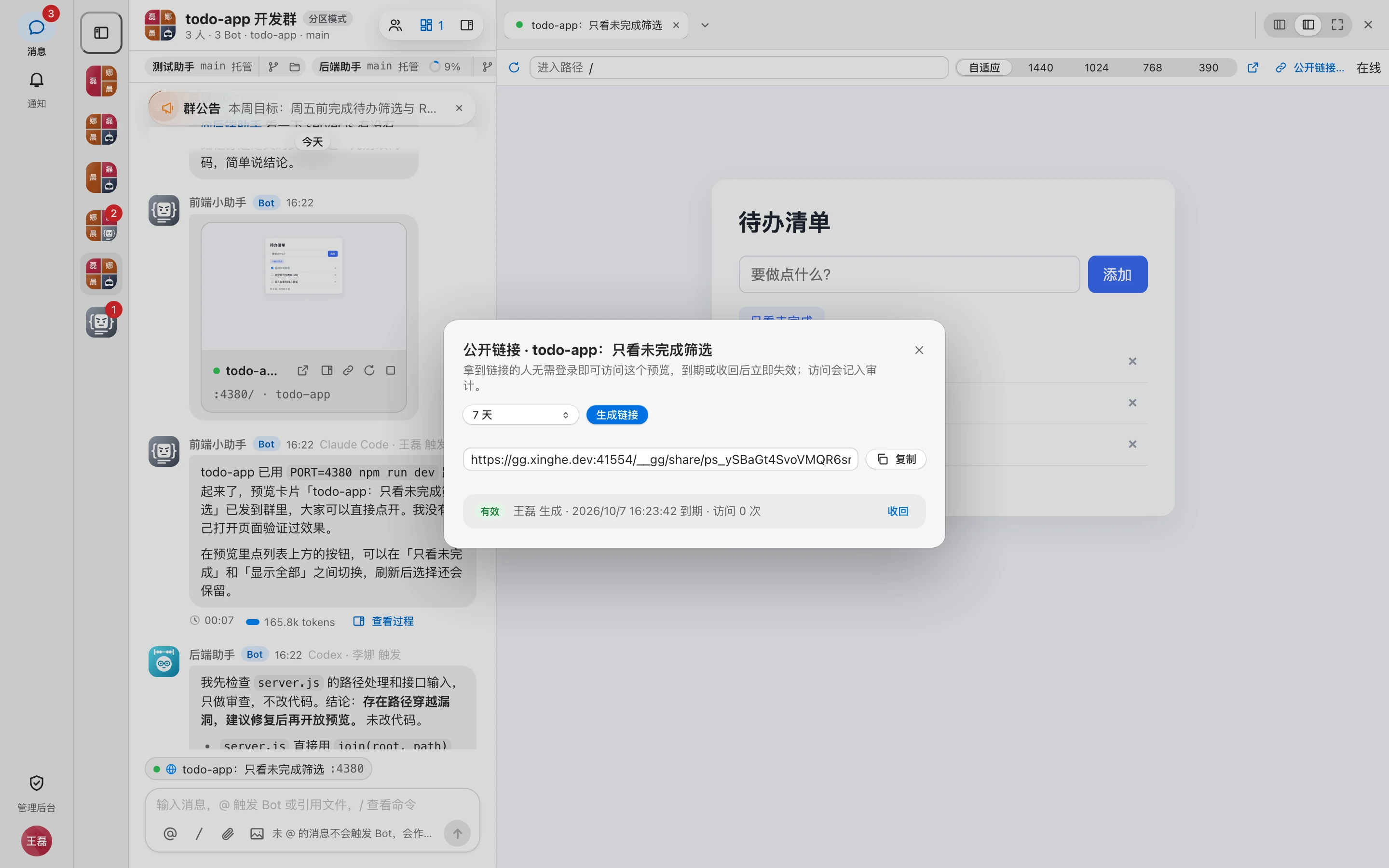
- Click 「公开链接」 (Public link) on the preview card, or 「公开链接…」 (Public link…) in the toolbar of a web tab in the workbench.
- Under 「有效期」 (Validity), choose 1, 3, 7, or 30 days. The default is 7 days.
- Click 「生成链接」 (Generate link).
- Click 「复制」 (Copy) and send the link to the other person.
WARNING
Anyone with the link can access this preview without signing in. The full link is shown only once, right after it's generated; once you close the dialog, you can't view it again, so copy it right away.
Validity period
- Public links always expire; there are no permanent links.
- The maximum validity is 30 days by default. Admins can adjust it with the system parameter 「预览公开链接最长有效期」 (Max validity of preview public links); see System parameters. Exceeding it shows 「公开链接最长有效 N 天」 ("Public links are valid for at most N days").
- The sysadmin can 「延长 7 天」 (Extend by 7 days) a valid link in the admin console; see Public links.
When a link becomes invalid
A link becomes invalid immediately if any of the following happens:
- It expires;
- It's revoked;
- The preview is closed (including idle auto-close).
After that, visitors see 「公开链接已失效或已被收回。」 ("This public link has expired or been revoked."). When the preview's machine is offline, visitors see 「预览所在的机器离线,稍后再试。」 ("The preview's machine is offline; try again later.").
View and revoke
Open the 「公开链接」 (Public link) dialog for the same preview. The bottom lists all public links for this preview, each row showing the status, creator, expiration time, and visit count.
| Status | Meaning |
|---|---|
| 有效 (Valid) | Can be accessed |
| 已过期 (Expired) | Past its validity period |
| 已收回 (Revoked) | Revoked manually |
| 预览已关闭 (Preview closed) | The preview is closed; the link can't be used |
Click 「收回」 (Revoke) on a valid link to invalidate it immediately. The Bot owner, group admins, and sysadmins can all revoke links.
Access auditing
Generating, revoking, and extending public links, as well as outside people visiting through a link, are all recorded in the audit log:
- 生成预览「X」的公开链接,有效 N 天 (Generated a public link for preview "X", valid for N days)
- 收回预览「X」的公开链接 (Revoked the public link for preview "X")
- 预览「X」的公开链接有效期改到 … (Changed the expiration of the public link for preview "X" to …)
- 通过公开链接访问预览「X」 (Visited preview "X" through a public link)
Each entry through the link is logged once, not every request. Sysadmins can view these in the admin console under 「审计记录」 (Audit log) by filtering for 「预览」 (Preview); see Audit log. All public links across the site are listed under Public links.