
Runs
This page covers a single run after a Bot is triggered: run card states, Gong's actions, how to read the 「过程」 (Process) panel, how to stop a run, and choosing a model and reasoning effort before sending.
Run card
After you @ a Bot and send, a run card for that Bot appears in the group and shows what it's doing in real time.

The card contains:
- Title row: a status icon; during a Bot handoff, the handoff progress (e.g. 「接力 2/3」, "Handoff 2/3").
- Subtitle: the Agent and the requester, e.g. 「Claude Code · 王磊 触发」 ("Claude Code · triggered by 王磊").
- Current step: a Gong animation plus what it's doing, or the last line of the reply it's writing.
- Stats: 「改动 N 个文件」 ("N files changed", click to view the changes), elapsed time, token usage (「用量未上报」, "usage not reported", if none was reported), and the number of subagents and background tasks.
- Buttons: 「查看过程」 (View process), 「停止」 (Stop), 「打断并追加」 (Interrupt and append).
When the run ends with a reply, the card becomes the Bot's reply message, keeping the changed files, elapsed time, usage, and 「查看过程」 (View process) below it. Up to 2 changed files are listed directly; more show as 「+N」.
When one message @s several Bots, the card shows 「扇出 · N 个 Bot 并行」 ("Fan-out · N Bots in parallel").
Collapse run cards
Turn on 「运行卡片默认折叠」 (Collapse run cards by default) in 「群设置」 (Group settings) to collapse cards by default. This affects only you. Cards waiting for approval or an answer are always expanded.
Run status
| Status | Meaning |
|---|---|
| 排队中 (Queued) | Waiting to start, e.g. 「本群上一轮未结束,排第 N」 ("previous turn in this group not finished, position N"), 「该 Bot 忙,排第 N」 ("this Bot is busy, position N"), 「工作区准备中」 ("preparing workspace") |
| 离线等待 (Waiting offline) | The Bot's machine is offline; it runs automatically once back online |
| 运行中 (Running) | Working |
| 等待审批 (Waiting for approval) | A permission request is waiting for the Bot owner; see Approvals and questions |
| 等待回答 (Waiting for answer) | The Bot asked group members a question and is waiting for an answer |
| 已完成 (Completed) | Finished normally |
| 已中断 (Interrupted) | Stopped, or interrupted by an error |
| 已作废 (Voided) | Voided before running, e.g. the offline wait timed out or the triggering message was recalled |
| 无权触发 (Not permitted) | You're not in the Bot's trigger scope; the run didn't start |
「等待审批」 (Waiting for approval) and 「等待回答」 (Waiting for answer) are shown as text; other states show only an icon, and you can hover to see the text.
Queueing rules
- The same Bot runs only one turn at a time in a given group; the next turn queues.
- Each Bot has a concurrency limit (2 by default for new Bots). When several groups call on it at once, the extra runs queue. Change the concurrency limit in Bot settings and permissions.
- Queued runs don't count against the concurrency limit.
- When a Bot is offline, a request waits at most 30 minutes (adjustable via the group-level parameter 「Bot 离线等待上线」 (Wait for offline Bot)). On timeout, it's voided and the requester is notified.
Session notices
By default, a Bot continues its previous session. In these cases, the card notes that a new session was started:
- 已按要求开启新会话 (Started a new session as requested; you sent
/new) - 本轮因配置变更开启新会话 (Started a new session this turn due to a configuration change)
- 原供应商已删除,已开启新会话 (The original provider was deleted; started a new session)
- 会话恢复失败,已开新会话并补送最近 50 条群消息 (Session resume failed; started a new session and sent the latest 50 group messages)
Gong's actions
The Gong (共字君) figure on the card changes with the run state:
| State | Action | Text |
|---|---|---|
| Running, writing a reply | Typing | 正在回复 (Replying) |
| Running, otherwise | Carrying | 正在工作 (Working) |
| Queued | Waiting | 排队中 (Queued) |
| Waiting for approval | Raising a hand | 等待审批 (Waiting for approval) |
| Waiting for answer | Asking | 等待回答 (Waiting for answer) |
Other states don't show Gong, only the status icon.
Process panel
Click 「查看过程」 (View process) on the run card to open the tab 「Bot 名 · 第 N 轮」 ("Bot name · turn N") in the workbench on the right.
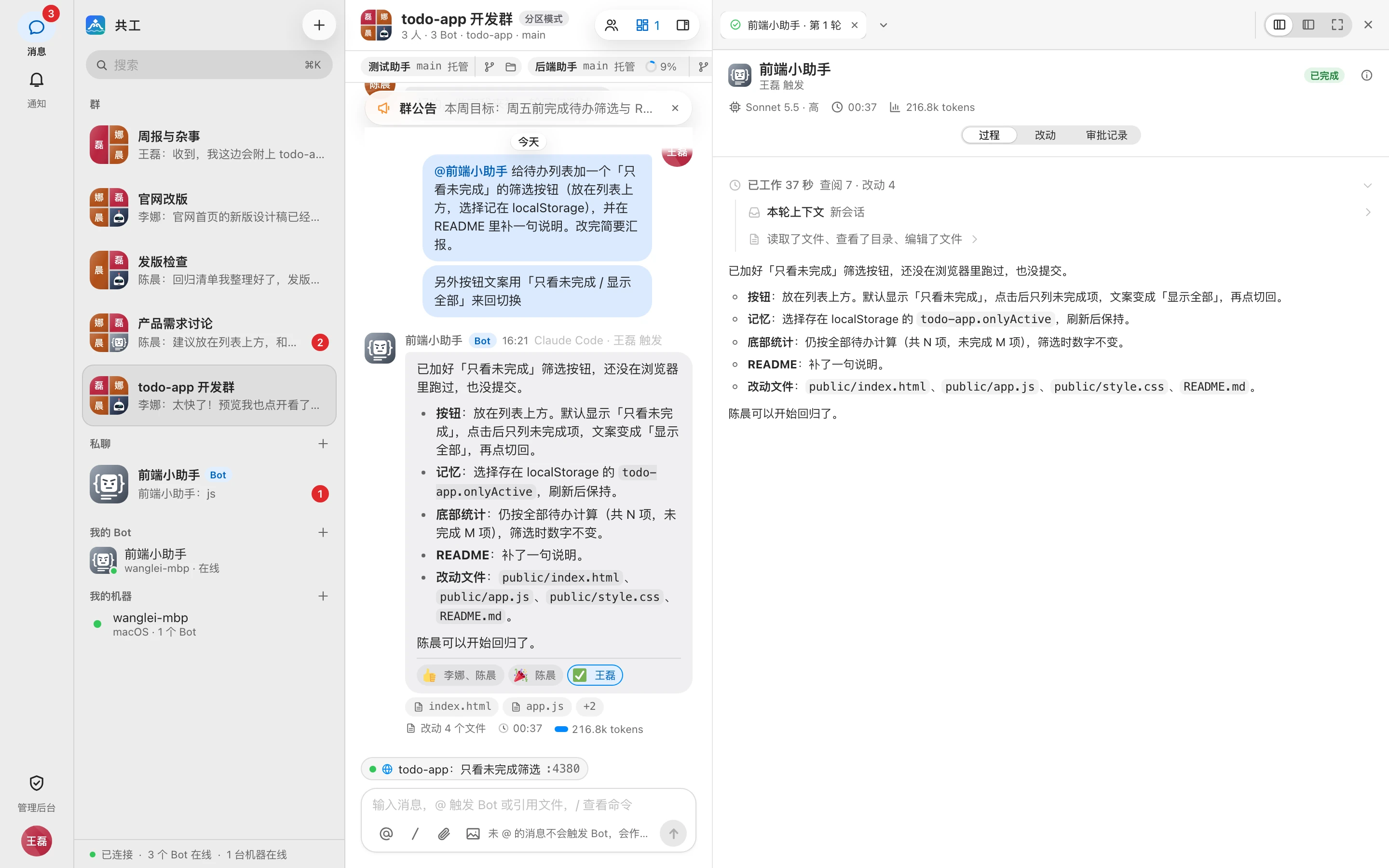
The top of the tab shows the requester, status, model (「默认」 (Default) if not specified), elapsed time, and usage. Click ⓘ 「机器与会话」 (Machine and session) to see the machine that ran it and the session ID. Below are three views:
| View | Contents |
|---|---|
| 过程 (Process) | What it was thinking and doing at each step |
| 改动 (Changes) | Which files this turn changed; see Diffs and files |
| 审批记录 (Approval log) | Triggers, permission requests and their outcomes, stops, and so on |
Click 「查看上一轮(还有 N 轮)」 ("View previous turn (N more)") to page back through this Bot's earlier turns in this group.
What the process view shows
The first row is 「本轮上下文」 (Context for this turn): labeled 「续用会话」 (Continued session) or 「新会话」 (New session), and listing which group messages were sent along with this turn.
After that, each step is listed in order:
| Type | Shown as |
|---|---|
| Thinking | 正在思考 / 思考 (Thinking / Thought) |
| Read, search, list directory | 正在读取 / 已读取 (Reading / Read), 已搜索 (Searched), 已列出 (Listed), etc.; a search with no results shows 「未找到」 (Not found) |
| Command | The command itself; the duration if longer than 2 seconds; expand to see the last 6 lines of output, and 「… 另有 N 行」 ("… N more lines") to see everything |
| Edit file | The file name and +N −M; click to go straight to that file's changes |
| Network access | 正在访问 / 已访问 (Fetching / Fetched) |
| MCP call | 「服务 · 工具」 ("server · tool"); Gonggong Space's built-in tools show a Chinese name (e.g. 「向群成员提问」, Ask group members). Expand to see 「参数」 (Parameters) and 「结果」 (Result) |
| Subagent | Name, task, and 「N 次调用 · 状态」 ("N calls · status": in progress / completed / failed / canceled / disconnected); expand to see its own process |
| Background task | Status (running / paused / completed / failed / stopped) and log path; you can click 「停止」 (Stop) |
| Permission request | The request and its outcome, e.g. 「等待 Bot 主人审批」 ("Waiting for Bot owner approval"), 「某某 已批准」 ("X approved"), 「超时未审批,已自动拒绝」 ("Not approved in time; automatically rejected") |
Read-only commands such as ls, cat, grep, and git status count as lookups, not commands.
Folding rules
The process panel merges small steps so you can skim quickly:
- Reply text, permission requests, the context for this turn, subagents, and background tasks always get their own row.
- Between them, 2 or more consecutive calls are merged into a group named after what the group did, e.g. 「读取了文件、运行了命令」 ("Read files, ran commands"). A single call isn't merged. Thinking inside a group doesn't count toward the number of calls.
- If a group contains failures, it's labeled 「N 个失败」 ("N failed").
- After the run ends with a final reply, all steps before the reply are folded into 「已工作 X 分 Y 秒」 ("Worked for X min Y s"), with a summary such as 「查阅 12 · 命令 3 · 改动 2 · 子 agent 1」 ("Lookups 12 · Commands 3 · Changes 2 · Subagents 1"). Background tasks that are still running aren't folded.
- Everything is collapsed by default; the group in progress and running subagents stay expanded. Anything you expand or collapse manually is remembered.
Process retention
Approval and question records are kept permanently. The full run process is kept for 30 days by default; after that, the card keeps only a summary and shows 「运行过程已过期,仅保留摘要」 ("Run process has expired; only the summary is kept"). The retention period is set by the admin; see System parameters.
Stop a run
Click 「停止」 (Stop) on the run card, or send /stop @Bot in the group (see Command reference).
- Any group member can stop a run.
- A queued run ends immediately; a running run ends once the machine confirms. Unhandled approvals and questions are voided along with it.
- For later turns in a Bot handoff, the button shows 「终止整条链」 (Terminate the whole chain). After you confirm, all unfinished turns on that handoff chain stop, and no further handoffs are triggered.
If the turn had already changed files when stopped, the card shows 「已停止 · 本轮改动 N 个文件留在工作区」 ("Stopped · N files changed this turn remain in the workspace") and offers two choices:
| Button | Effect |
|---|---|
| 保留改动 (Keep changes) | Default. No rollback, no automatic commit, no stash |
| 丢弃本轮改动 (Discard this turn's changes) | Restores only the files touched this turn; earlier uncommitted changes are unaffected |

Only the requester or the Bot owner can choose, and there's no time limit.
If you don't want to stop but just want to add requirements, use interrupt and append; see Directing Bots in a group.
Choose a model and reasoning effort
After you @ a Bot in the input box, a configuration chip for that Bot appears below the input box, e.g. 「后端助手 · Sonnet」. Click it to choose:
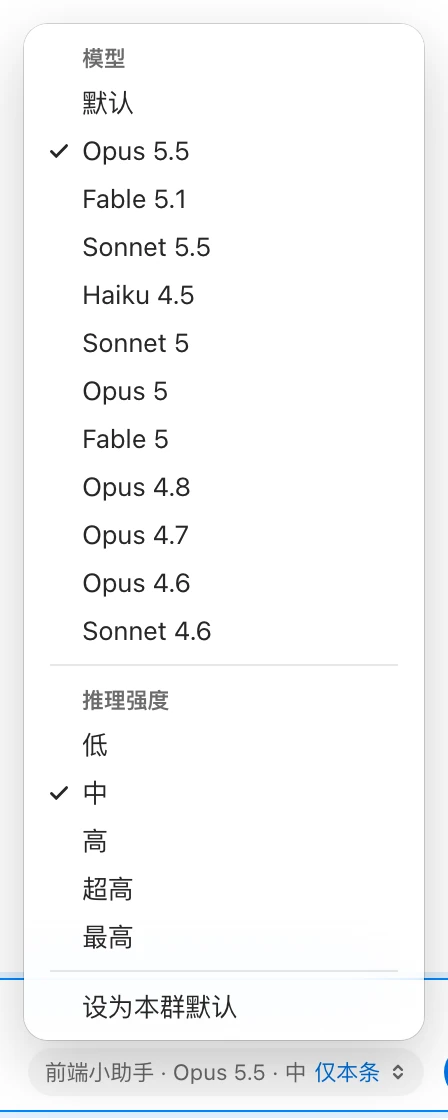
- 「模型」 (Model): the models reported as available by the machine.
- 「推理强度」 (Reasoning effort): the reasoning effort levels the Agent supports.
After you choose, the chip shows 「仅本条」 (This message only), and the choice applies only to this message. Click 「设为本群默认」 (Set as group default) in the menu to make it this Bot's default configuration in this group.
Order of precedence: the choice for this message → the group default → the Bot's own default configuration (see Bot settings and permissions).
- Only the Bot owner or a group admin can switch; others see 「只有 Bot 主人或群管理员可以切换」 ("Only the Bot owner or a group admin can switch"). This restriction doesn't apply in direct chats.
- If the machine hasn't reported available models yet, the chip is disabled with the hint 「机器尚未上报可选模型」 ("The machine hasn't reported available models yet").
The permission tier isn't chosen here: the Bot owner sets the tier for this group under 「群设置 → Bot」 (Group settings → Bot); see Groups and direct chats.