
Knowledge base and secrets
This page covers two things: the knowledge base, which every Bot in the group remembers, and secrets, which hand tokens and passwords to Bots safely.
Knowledge base
Each group has a knowledge base for facts and conventions every Bot should remember, such as the release process or API naming conventions. Bots can read it on every run, and they also add to it themselves.
Where to find it
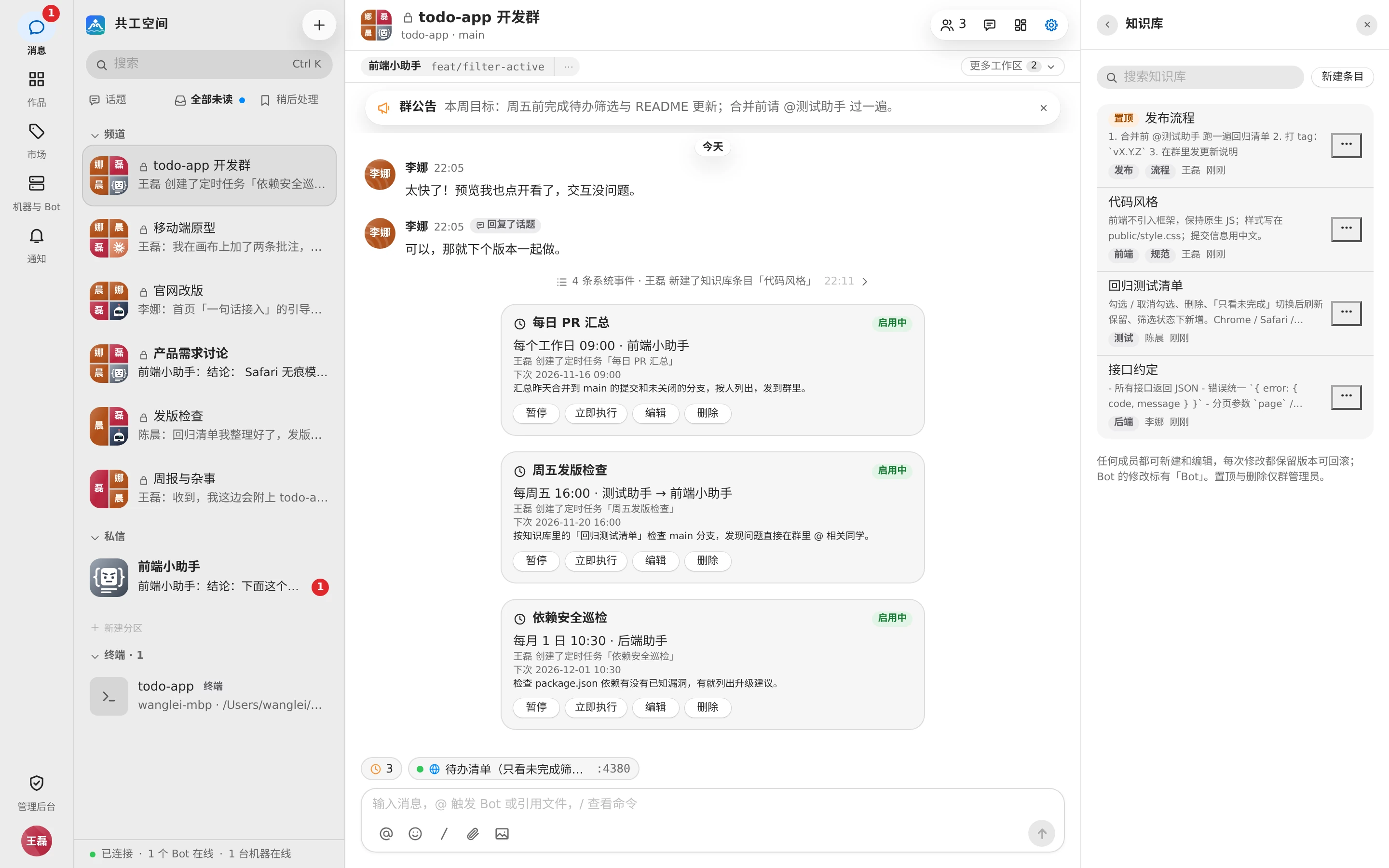
- Group settings sidebar → 「知识库」 (Knowledge base) (also under 「私聊设置」 (Chat settings) in direct chats).
- You can also pin an entry to the tab bar at the top of the group; see Group tab bar.
Pinned entries are listed first (marked 「置顶」 (Pin)); the rest are sorted by update time. Each entry shows its title, summary, tags, last editor, and time; entries a Bot has changed are marked 「Bot」. 「搜索知识库」 (Search knowledge base) at the top searches titles, bodies, and tags.
Create and edit
- Click 「新建条目」 (New entry).
- Fill in 「标题」 (Title), e.g. 「发布流程」 ("Release process").
- Press Enter in 「标签」 (Tags) to add tags (up to 10).
- Write the 「正文」 (Body). Markdown is supported, and you can switch between 「编辑 / 预览」 (Edit / Preview).
- Click 「保存」 (Save); you'll see 「已保存,本群 Bot 下一轮读到」 ("Saved. This group's Bots read it on their next run").
| Limit | Amount |
|---|---|
| Entries per group | 200 |
| Title | 100 characters |
| Body | 20,000 characters |
| Tags | 10 per entry |
To edit an existing entry, click 「编辑」 (Edit) in its 「更多」 (More) menu. If two people edit the same entry at once, whoever saves second sees 「这条知识已被他人更新」 ("Someone else updated this entry"); copy your body first, then click 「载入最新版本」 (Load latest version).
Save to the knowledge base
Messages in the group can be saved straight into the knowledge base: click 「存入知识库」 (Save to knowledge base) in the message's 「更多」 (More) menu. This opens 「新建条目」 (New entry) with the title taken from the message's first line and the whole message, plus its source, as the body. Review it and click 「保存」 (Save).
Version history
Every change keeps a version. Click 「历史版本」 (History) in the entry's 「更多」 (More) menu:
- Each version shows its v number, the action (create / edit / roll back), who made it, and when; the current version is marked 「当前」 (Current).
- Click 「查看」 (View) to switch between 「改动」 (Changes; the diff against the previous version) and 「内容」 (Contents).
- 「回滚到此版本」 (Roll Back to This Version) saves the old content as a new version and shows 「已回滚到 vN」 ("Rolled back to vN").
Who can do what
| Action | Who |
|---|---|
| View, create, edit, roll back | Any group member |
| Pin / unpin, delete | Group admins |
Deletion can't be undone; starting with their next turn, the group's Bots no longer see the entry. Every change to the knowledge base posts a notice in the group.
How Bots use it
- At the start of every run, the full text of pinned entries goes straight into the Bot's context (up to about 4,000 tokens; anything beyond is truncated, and the Bot reads the full text itself when needed). Other entries are listed by title and tags only, and the Bot reads them on demand.
- A resumed session only receives the part that 「群知识库自你上次读取后有变化」 ("the group knowledge base has changed since you last read it").
- Bots can create and update entries themselves; a Bot can delete entries only when the person who started the turn is a group admin.
- So conventions that are important and must be followed every time are best pinned.
WARNING
Don't put secrets or passwords in the knowledge base. Use the secrets described below for credentials you need to hand to a Bot.
Secrets
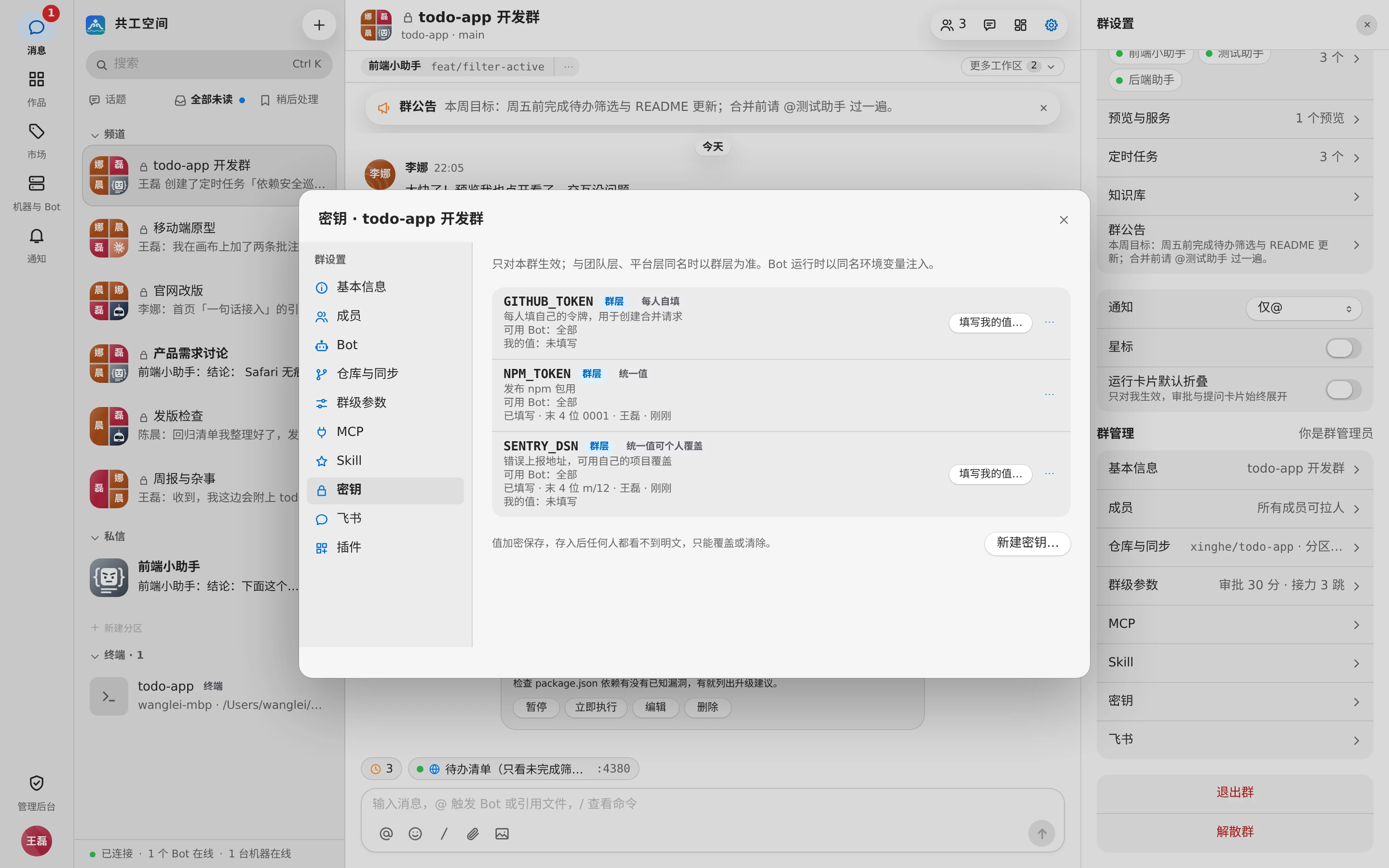
Secrets are how you hand tokens, passwords, and the like to Bots: values are stored encrypted on the server, injected into the Bot's run as environment variables of the same name, and masked if they appear in output. Nobody can see the plaintext.
Four levels
| Level | Where it's managed | Who can change it |
|---|---|---|
| Platform | Admin console 「配置中心」 (Configuration) → 「密钥」 (Secrets) | Sysadmins |
| Team | Team settings → 「密钥」 (Secrets) | Team admins |
| Group | Group settings → 「密钥」 (Secrets) (not in direct chats) | Group admins |
| My values | Avatar menu → 「设置…」 (Settings…) → 「我的密钥」 (My secrets) | You |
- When names collide, the group level wins over the team level, and the team level wins over the platform level. Group settings show inherited team and platform secrets (read-only); overridden ones are marked 「已被本群覆盖」 (Overridden by this group) or 「已被团队层覆盖」 (Overridden by the team layer).
- Changes take effect on the next turn.
Create a secret
An admin clicks 「新建密钥…」 (New secret…) at the corresponding level:
| Field | Description |
|---|---|
| 名称 (Name) | The environment variable name, e.g. FEISHU_DEVOPS_TOKEN. Only uppercase letters, digits, and underscores, starting with a letter; can't be renamed after creation |
| 用途 (Purpose) | What it's for and how to obtain it |
| 模式 (Mode) | See the table below |
| 可用 Bot (Bots) | 「全部 Bot」 (All bots) or 「指定 Bot」 (Selected bots) |
| 到期时间 (Expires) | Leave empty for no expiry |
| 启用 (Enable) | When disabled, it's no longer injected |
| 统一值 (Shared value) | Can be filled in later; once stored, the plaintext is never shown again |
| 我的值 (My value) | When creating a 「每人自填」 (Per member) or 「统一值可个人覆盖」 (Shared, member may override) secret, you can fill in your own value at the same time |
| Mode | Description |
|---|---|
| 统一值 (Shared value) | Everyone uses the same value and can't override it; suits service tokens the team shares |
| 统一值可个人覆盖 (Shared, member may override) | Has a shared value; a member who fills in their own value uses theirs |
| 每人自填 (Per member) | No shared value; everyone fills in their own; suits tokens tied to personal accounts |
- Values must be at least 8 characters.
- Reserved system names can't be used, e.g. names starting with
ANTHROPIC_,CLAUDE_,CODEX_,OPENAI_,GG_,GONGGONG_, orGIT_; you'll see 「… 是系统保留的环境变量名,请换一个名称」 ("… is a reserved environment variable; pick another name"). - The row menu offers 「编辑…」 (Edit…), 「清除统一值」 (Clear shared value), and 「删除」 (Delete). Deleting removes the definition, the shared value, and every member's personal value together, and can't be undone.
Which value a run uses
On each run, the value is chosen based on the person who started the turn:
- If the mode isn't 「统一值」 (Shared value), they've filled in their own value, and the Bot is on their own machine (or they've turned on 「允许在他人机器上的 Bot 使用」 (Allow bots on other people's machines)): their own value is used.
- Otherwise the shared value is used (「每人自填」 (Per member) has no shared value).
- If neither exists, nothing is injected.
Secrets that are disabled, expired, or not allowed for this Bot are skipped. The run details show 「本次注入的密钥」 (Secrets injected) and where each came from (personal / group / team / platform).
Other people's machines
A machine's owner can read the environment variables of Bot processes on their machine. That's why your personal values are, by default, injected only into Bots on your own machine; to let Bots on other people's machines use them, turn on 「允许在他人机器上的 Bot 使用」 (Allow bots on other people's machines).
MCP configurations can reference secrets with ${secret:NAME}, which is replaced with the actual value at run time; an MCP server with a missing value isn't started for that turn.
Fill in your own values
There are three places where you fill in your own values:
- My secrets: Avatar menu → 「设置…」 (Settings…) → 「我的密钥」 (My secrets) lists every 「每人自填」 (Per member) and 「统一值可个人覆盖」 (Shared, member may override) secret in the team, grouped by source. Each row offers 「填写…」 (Fill in…) / 「更新…」 (Update…) and 「清除」 (Clear), and its own 「允许在他人机器上的 Bot 使用」 (Allow bots on other people's machines) setting.
- Group settings → Secrets: read-only for members, but on 「每人自填」 (Per member) and 「统一值可个人覆盖」 (Shared, member may override) rows you can 「填写我的值…」 (Fill in my value…) or 「更新我的值…」 (Update my value…).
- Fill-in cards sent by a Bot; see below.
Filling in a name once applies to every definition with that name across the team.
When a Bot asks you for a secret
When a Bot finds a secret missing while working, it posts a card in the group:
- If the missing value is 「每人自填」 (Per member) or 「统一值可个人覆盖」 (Shared, member may override), the card goes to the person who started the turn, e.g. 「后端助手 请 王磊 填写自己的密钥:…」 ("后端助手 asks 王磊 to fill in their own secrets: …").
- If it's a 「统一值」 (Shared value), the card goes to admins, e.g. 「后端助手 请管理员填写密钥:…」 ("后端助手 asks an admin to fill in the secrets: …"). Only admins of the level where the secret lives can fill it in.
- Click 「填写密钥」 (Fill in secrets) on the card. Others see 「等待填写」 (Waiting).
- Enter the value in the 「填写密钥」 (Fill in secrets) dialog (at least 8 characters). If the Bot is on someone else's machine, the dialog includes 「允许在他人机器上的 Bot 使用」 (Allow bots on other people's machines), checked by default.
- After saving, the card changes to 「已填写」 (Filled in). If the turn was triggered directly by your message, the Bot continues automatically (the group shows 「已填写密钥,某某 继续处理」 ("Secrets filled, X carries on")); otherwise you see 「已填写密钥,重新 @某某 即可继续」 ("Secrets filled, @X again to carry on").
When there are cards you haven't filled in, the top of the group shows 「本群有 N 个密钥待你配置」 ("N secrets here need your setup"); click 「去配置」 (Set up).
Cards in Feishu
When the group is bound to Feishu with sync turned on, the card is also sent to the Feishu group and @-mentions you. Click 「去填写」 (Fill in) to open Gonggong's fill-in page (only the requester can fill it in); the value is never entered in Feishu. Once filled, the Feishu card also changes to 「已填写」 (Filled in).
Secrets a Skill needs
A Skill can declare the secrets it reads in the frontmatter at the top of SKILL.md, so once it is brought in, Gonggong knows what is missing and whom to remind:
secrets:
  - name: DW_MANAGER_API_KEY        # environment variable name: uppercase letters, digits and underscores
    title: Data warehouse Manager key (production)
    description: Issued under Manager's "Profile → API Key"; read-only is enough
    url: https://manager.example.com/keys   # optional; where to apply, https only
    placeholder: dwk_…                       # optional; format hint in the input box
    mode: personal                           # personal: each member fills their own · shared: one value · shared_overridable: one value members may override
    required: true                           # false means optional (such as a test environment key)
Up to 10 entries. A bare name (such as - DW_KEY) also works and means a required shared value. secrets is a Gonggong extension; agents ignore it when they load the Skill.
Once it is brought in:
- Above the group's input box, 「本群有 N 个密钥待你配置」 ("N secrets here need your setup") counts only required entries and appears only to people who need to act: members who fill their own value, and admins who fill a shared value or create a definition. Click 「去配置」 (Set up) to fill them in by Skill, each with its purpose, apply link and format hint; optional entries sit under 「可选配置」 (Optional). Click × to stop the reminder for 24 hours; it comes back right away when the missing set changes (say, a Skill upgrade adds one) or a Bot sends you a card for it.
- Group settings → Secrets always has 「配置密钥」 (Set up secrets).
- Definitions of "personal" secrets live at the team level, made once per team (by a team admin); your own values are kept per team, you and name: fill one once and other groups of the team using the same name stop asking.
- For a Skill you brought in for yourself whose secret the team doesn't define yet, your first fill also creates a "personal" definition at the team level — only the definition; everyone else still fills their own.
At run time the Bot knows from the start which required secrets its Skills are missing. When the group has no definition of one yet, the Bot's request first posts a 「按声明创建」 (Create as declared) card to that level's admins, naming who can handle it; once an admin clicks 「创建」 (Create), the definition is made from the declaration and the fill card follows. If the Skill is upgraded or removed, or someone creates a secret of the same name meanwhile, the old card stops working; just ask the Bot again.
Who sees what
- Once stored, nobody can see the plaintext — not even admins; it can only be overwritten or cleared. Lists only show 「已填写 · 末 4 位 … · 修改人 · 时间」 ("Filled in · ends in … · edited by · time").
- Admins can see who has filled in personal values (「已填个人值:…」 ("Own values from: …")), but not the values themselves.
- Bots only see secret names and their status, and read injected values from environment variables.