
Approvals and questions
This page covers the two situations during a run where a person has to decide: a Bot's permission requests (approvals), and a Bot asking group members questions.
Permission requests
When a Bot wants to do something beyond its current permission tier, the run pauses, a permission request appears on the card, and the status changes to 「等待审批」 (Waiting for approval).
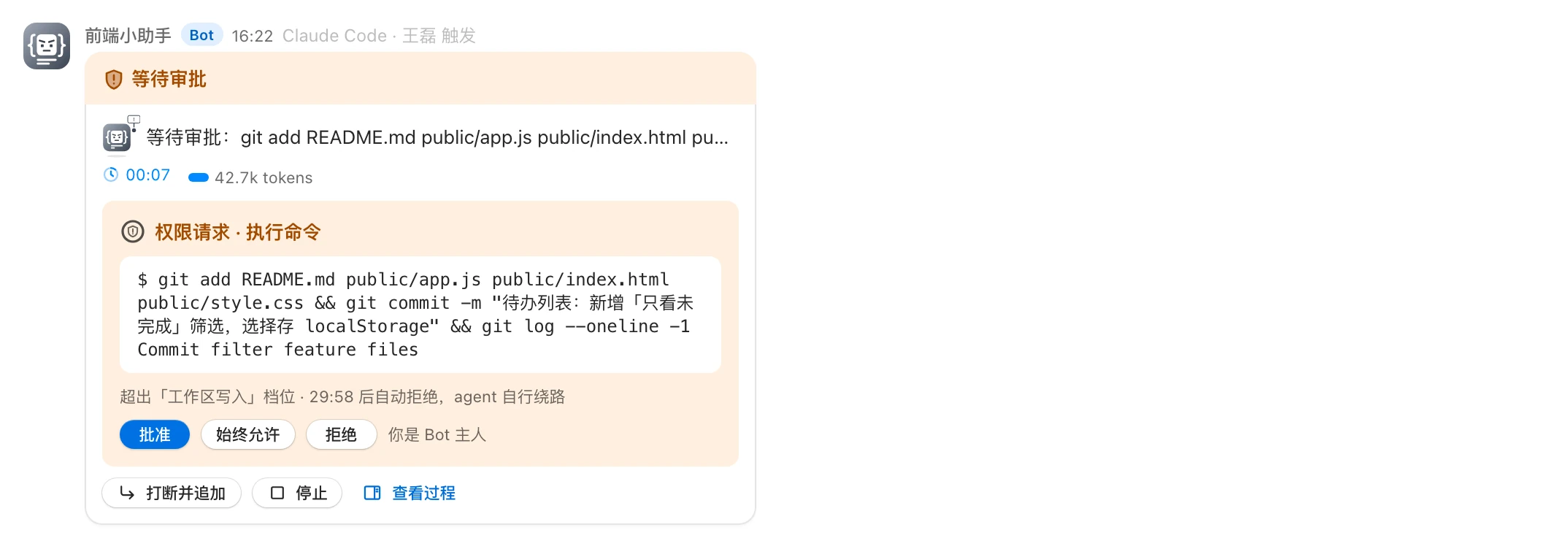
The card shows:
- The title 「权限请求 · 类型」 ("Permission request · type"). Types include: 执行命令 (run command), 访问网络 (network access), 写入文件 (write file), 删除文件 (delete file), 移动文件 (move file), 读取文件 (read file), 搜索 (search), and 其他操作 (other).
- The specifics, such as the command to run.
- An explanation line, e.g. 「超出「工作区写入」档位 · 29:41 后自动拒绝,agent 自行绕路」 ("Exceeds the 'Workspace write' tier · auto-rejected in 29:41, the agent will work around it"). The countdown ring turns orange in the last 30 seconds.
Who can approve
Only the Bot owner can handle it. Everyone else sees 「仅 Bot 主人 某某 可操作,你只能查看」 ("Only the Bot owner X can act; you can only view"). Group admins can't approve on the owner's behalf either.
| Button | Effect |
|---|---|
| 批准 (Approve) | Allow this once |
| 始终允许 (Always allow) | Remember this command for this Agent session; identical commands are approved automatically afterward (shown only if the Agent offers this option) |
| 拒绝 (Reject) | Reject this once; the Agent will find another way |
After it's handled, the card shows the outcome, e.g. 「某某 已批准 · 14:32」 ("X approved · 14:32") or 「某某 已拒绝 · 14:32 · agent 将自行绕路」 ("X rejected · 14:32 · the agent will work around it").
Automatic rejection on timeout
A permission request waits 30 minutes by default. If nobody handles it, it's rejected automatically, showing 「超时未处理,已自动拒绝」 ("Not handled in time; automatically rejected"), and the Agent works around it.
- Group admins can adjust this for their group (1–1440 minutes) with the group-level parameter 「权限审批等待 · 分区(分钟)」 (Permission approval wait · partition, minutes); see Groups and direct chats.
- The site-wide default is set by the sysadmin in 「权限审批等待(分区模式)· 群默认」 (Permission approval wait (partition mode) · group default); see System parameters.
When the run is stopped, the handoff chain is terminated, or someone uses interrupt and append, unhandled requests are voided automatically.
How tiers relate to approvals
A Bot's permission tier determines which operations need approval:
| Tier | Description |
|---|---|
| 只读 (Read-only) | Can only view; writing files and running commands with side effects need approval |
| 工作区写入 (Workspace write) | Can edit files in the workspace directly; running commands and other out-of-scope operations need approval |
| 完全访问 (Full access) | Everything is allowed automatically; no more approval prompts |
Each request is decided in this order:
- Gonggong Space's built-in tools (such as asking group members a question or reading group messages) are always allowed.
- If the tier is Full access: allowed automatically.
- If it matches the Bot's 「命令审批」 (Command approval) rules: approved automatically, and the process shows 「已按命令审批规则自动批准」 ("Automatically approved by command approval rules").
- Otherwise, the Bot owner is asked to approve.
「命令审批」 (Command approval) is configured by the Bot owner in the Bot's settings, with the options 「每次询问」 (Ask every time), 「白名单自动」 (Auto for allowlist), and 「全部自动」 (Auto for all); see Bot settings and permissions.
Want fewer approvals?
- The Bot owner can enable the allowlist in 「命令审批」 (Command approval) and add common command prefixes (e.g.
pnpm test). - Or raise this group's tier under 「群设置 → Bot」 (Group settings → Bot). Tier changes take effect immediately on turns in progress; when raised to Full access, pending requests are approved automatically.
WARNING
When the tier is Full access, the Bot can be triggered only by the specified list, even if its trigger scope is set to 「任何群成员」 (Any group member).
Bots asking group members questions
When a Bot is unsure, it uses 「向群成员提问」 (Ask group members) to post a question card, and the status changes to 「等待回答」 (Waiting for answer).
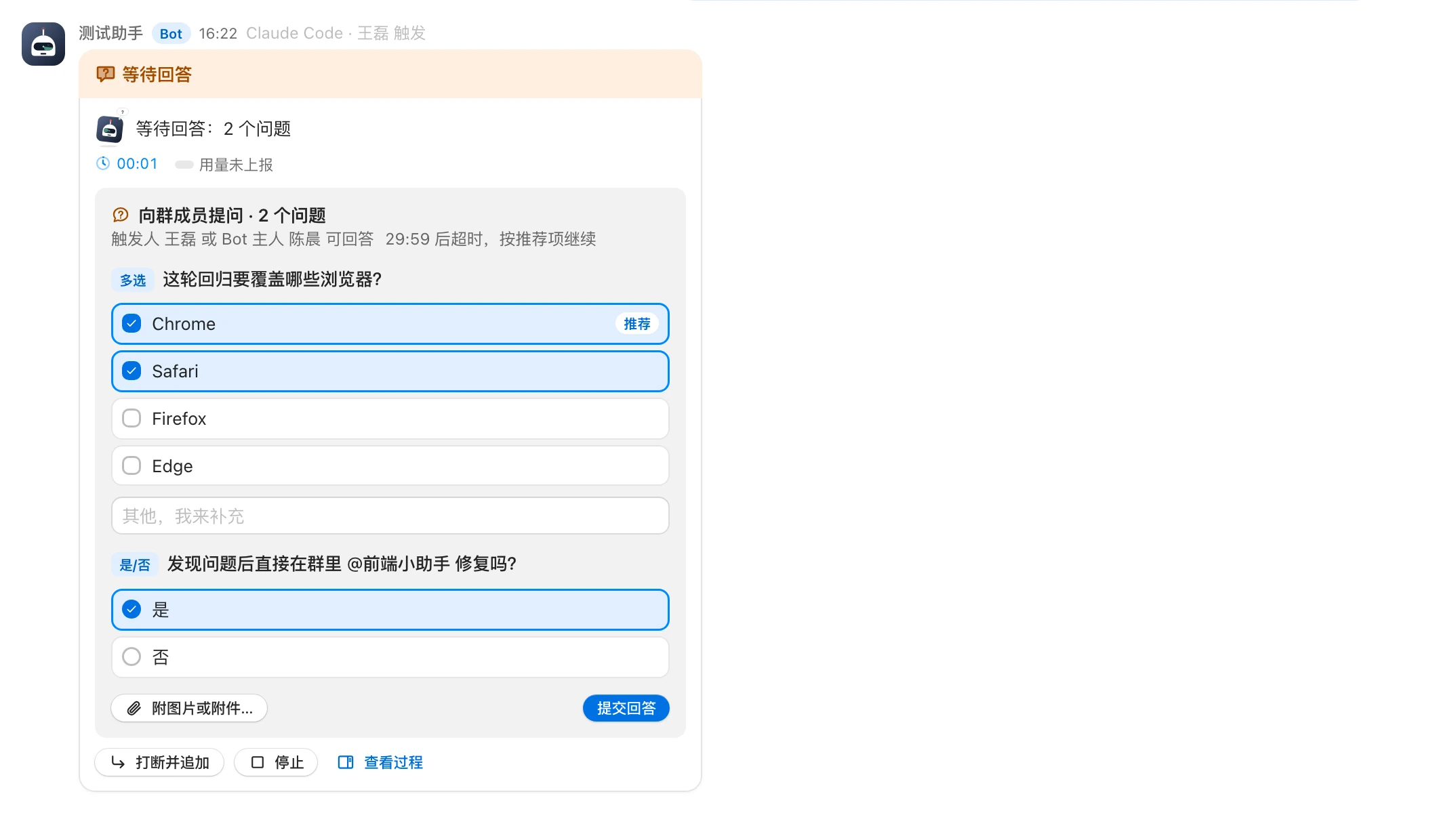
- The card is titled 「向群成员提问 · N 个问题」 ("Ask group members · N questions"), with up to 4 questions per card (the system parameter 「提问卡片每张题数上限」 (Max questions per card) can lower this).
- Question types:
| Type | How to answer |
|---|---|
| 单选 (Single choice) | Pick one option, or fill in 「其他,我来补充」 ("Other, let me add") |
| 多选 (Multiple choice) | Pick several options; you can also add text |
| 是/否 (Yes/No) | Pick one of two |
| 自由文本 (Free text) | Fill in 「自由作答」 (Free answer) |
- The Bot can mark an option as 「推荐」 (Recommended).
- You can click 「附图片或附件…」 (Attach images or files…) to attach files, then click 「提交回答」 (Submit answer).
Who can answer
The requester or the Bot owner can answer; the card states 「触发人 某某 或 Bot 主人 某某 可回答」 ("Requester X or Bot owner Y can answer"). Everyone else can only view.
Timeout
Questions wait the same length of time as permission requests (30 minutes by default). The card shows 「mm:ss 后超时,按推荐项继续」 ("Times out in mm:ss, then continues with the recommended option").
On timeout, the Agent continues with the recommended option or its own best judgment, and lists the assumptions it made in its final reply. The card shows 「无人回答,agent 已按推荐项继续」 ("No one answered; the agent continued with the recommended option").
After someone answers, the card shows 「某某 已回答 · 已写入审计记录」 ("X answered · recorded in the audit log").
Notifications
- When there's a permission request, the Bot owner is notified.
- When there's a question, the requester and the Bot owner each receive a notification.
- Once handled, timed out, or voided, the related notifications are marked as handled automatically.
- With browser notifications enabled, approvals and questions are also pushed as system notifications.
- These alerts still arrive even if you've turned on 「消息免打扰」 (Mute notifications) for the group.
For how to use the notification center, see Notifications.