
Command reference
This page lists every command available after typing / in the input box: the system commands built into Gonggong Space, and the Agent commands that Agents provide themselves and that are passed through as-is.
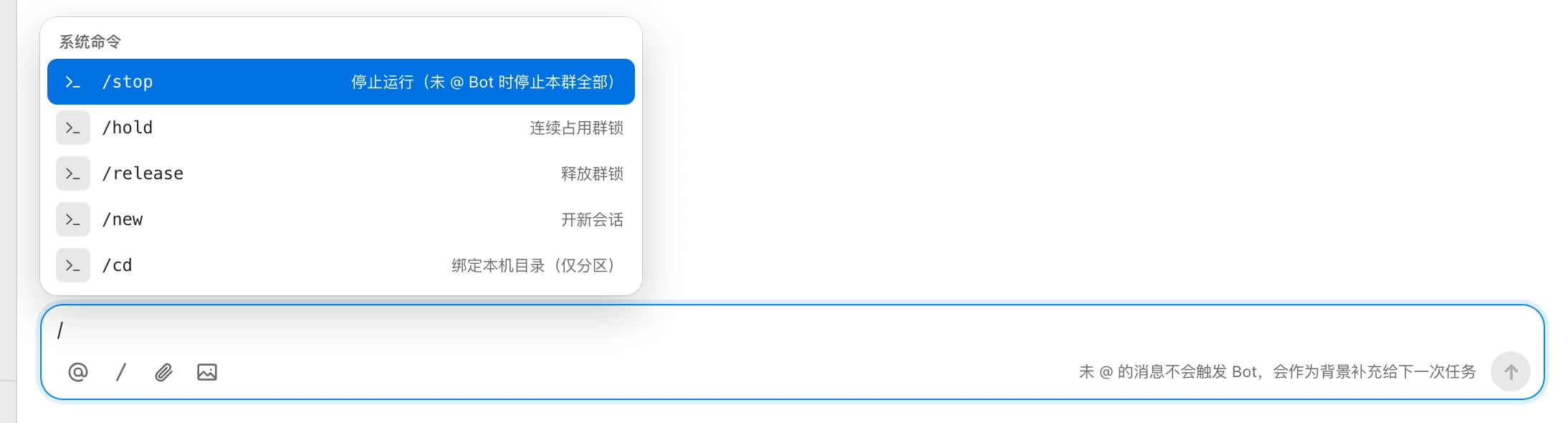
How to enter commands
- Type
/at the start of the input box, or click 「命令」 (Commands) in the toolbar, to open the suggestion list. - You can also @ a Bot first and then type the command, e.g.
@后端助手 /compact. Both forms are equivalent. - Use ↑ / ↓ to choose, Enter or Tab to insert, and Esc to close.
- Command names are case-sensitive.
The suggestion list has two groups:
| Group | Contents |
|---|---|
| 系统命令 (System commands) | Built into Gonggong Space; see the table below |
| AGENT 命令 (Agent commands) | Labeled 「ACP 上报」 (reported via ACP); provided by the Agent used by the Bot(s) @-mentioned in the message |
Don't see Agent commands?
Agent commands are listed only for the Bots you @. Type @BotName first, then /. Also, a Bot's Agent commands appear only after it has run at least one turn in this group.
Command messages don't trigger a normal run and aren't passed to Bots as background context. The result is shown as a notice in the group.
System commands
| Command | UI description | Syntax | Who can use it |
|---|---|---|---|
/stop | 停止运行(未 @ Bot 时停止本群全部) (Stop runs; stops all in the group if no Bot is @-mentioned) | /stop or /stop @Bot … | Group members |
/new | 开新会话 (Start a new session) | /new @Bot … | Group members |
/cd | 绑定本机目录(仅分区) (Bind a local directory; partition mode only) | /cd @Bot /absolute/path or /cd @Bot --reset | Bot owner |
/hold | 连续占用群锁 (Hold the group lock) | /hold | — |
/release | 释放群锁 (Release the group lock) | /release | — |
/stop
Stops running and queued turns.
/stop @后端助手
/stop- With @: stops only the unfinished turns of those Bots.
- Without @: stops the unfinished turns of all Bots in the group.
- If a Bot handoff chain is involved, the whole chain is terminated.
- The group shows a notice such as 「/stop · 停止 后端助手 的 1 个轮次」 ("/stop · stopped 1 turn of 后端助手"). If there's nothing to stop, it shows 「没有运行中的轮次」 ("No turns in progress").
- The action is recorded in the audit log.
/new
Makes the Bot start a brand-new session on its next turn, forgetting the earlier conversation.
/new @后端助手- You must @ at least one Bot; otherwise you'll see 「/new 需要同时 @ 一个 Bot」 ("/new requires @-mentioning a Bot").
- The group shows 「后端助手 下一轮将开新会话」 ("后端助手 will start a new session next turn"), and the next run card shows 「已按要求开启新会话」 ("Started a new session as requested").
- It also clears this Bot's context usage display.
- The 「开新对话」 (New conversation) button in the context usage panel of the group header sends this command; see Context usage and compaction.
/cd
Makes the Bot work directly in a local directory on its machine instead of a workspace managed by Gonggong Space.
/cd @后端助手 /Users/wanglei/code/todo-app
/cd @后端助手 --reset- Only the Bot owner can use it, and only in partition-mode groups.
- You must @ exactly one Bot. The path must be an absolute path on the Bot's machine.
--reset: go back to the managed workspace.- On success, you'll see 「✓ 后端助手 已绑定到 /Users/…(本机目录)」 ("✓ 后端助手 is bound to /Users/… (local directory)") or 「✓ 后端助手 已使用托管工作区」 ("✓ 后端助手 is using the managed workspace").
- It can't run while the Bot is offline.
Common errors:
| Message | Cause |
|---|---|
| /cd 仅分区模式可用;强制同步群里非托管工作区的 Bot 为「不参与」 ("/cd is only available in partition mode; in forced-sync groups, Bots without a managed workspace are 'not participating'") | The group isn't in partition mode |
| 只有 Bot 主人可以使用 /cd ("Only the Bot owner can use /cd") | You're not this Bot's owner |
| /cd 需要本机绝对路径,如 /Users/me/code/repo ("/cd needs an absolute local path, e.g. /Users/me/code/repo") | You wrote a relative path |
| 某某 离线,无法执行 /cd ("X is offline; can't run /cd") | The Bot's machine isn't online |
For workspaces and modes, see Repositories and workspaces.
/hold and /release
These are for the group lock in forced-sync groups. In the current version, typing them in a group only shows 「/hold 仅在强制同步群可用」 ("/hold is only available in forced-sync groups") or 「/release 仅在强制同步群可用」 ("/release is only available in forced-sync groups"), with no actual effect.
Agent commands
Agent commands are commands reported by the Agent a Bot uses (Claude Code, Codex, etc.), such as /compact. Which commands exist and what each one does is defined by the Agent itself; the descriptions in the suggestion list also come from the Agent.
@后端助手 /compact- After you send it, the command text is passed to the Agent as-is, without group context.
- It runs as an Agent command only if you @ a Bot and every Bot you @ supports the command.
- In a direct chat with only one Bot, you can omit the @.
- A
/xxxthat doesn't meet these conditions is treated as a normal message. For example,/path/to/file @后端助手 看下("take a look") is sent to the Bot as an ordinary task.
Name clashes with system commands
When an Agent command has the same name as a system command, it appears in the suggestions as /BotName:command, labeled 「与系统命令重名」 ("Same name as a system command"). Typing /new directly runs the system command; to run the Agent's command of the same name, use the prefixed form:
/后端助手:newRemove any spaces from the Bot name.