
Bot settings and permissions
This page covers the settings in Bot details: who can trigger the Bot, which files it can touch, whether commands need approval, concurrency, default workspace, provider, model and reasoning effort, and deleting a Bot.
Open Bot details
Click a Bot under 「我的 Bot」 (My Bots) in the sidebar to open its overview page, then click 「编辑」 (Edit) in the top-right to open 「Bot 详情」 (Bot details). Sysadmins can also select a row in 「管理后台 → Bot」 (admin console → Bot) to edit it — see Bots and groups.
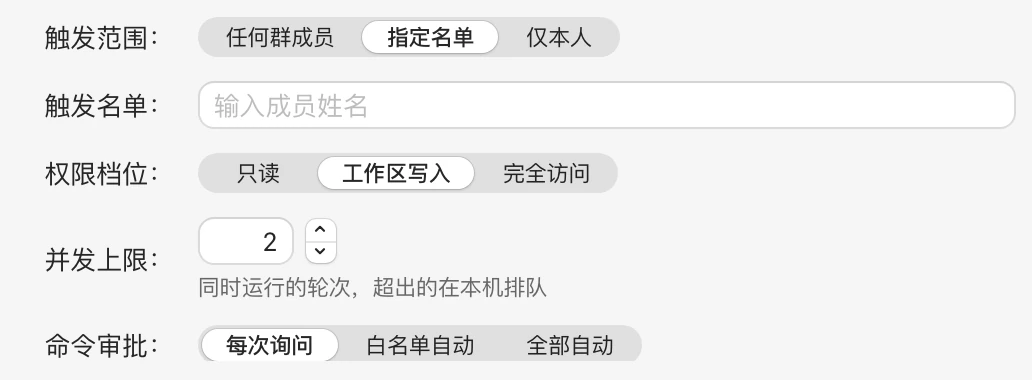
Click 「保存」 (Save) at the bottom when you're done. Settings take effect the next time a new session starts; sessions in progress aren't affected.
Who can change settings
- The Bot owner and sysadmins can change most settings.
- 「命令审批」 (Command approval) can be changed only by the Bot owner — not even by sysadmins.
- 「默认工作区」 (Default workspace) and 「供应商」 (Provider) can be changed only by the Bot owner, and require the machine to be online.
- Everyone else sees them read-only.
Role and system prompt
- Role: Change the avatar character — see Create a Bot.
- System prompt: The Bot's role description and in-group bio, up to 4000 characters. Groups can add more on top — see Groups and direct chats.
Trigger scope
Decides who in a group can put the Bot to work by @-mentioning it:
| Option | Meaning |
|---|---|
| 任何群成员 (Any group member) | Default; all members of groups the Bot is in can trigger it |
| 指定名单 (Allowlist) | Only listed members can trigger it. When selected, a 「触发名单」 (Trigger list) appears; type member names to add them |
| 仅本人 (Owner only) | Only the Bot owner can trigger it |
Permission tier
Decides what the Bot can do in its workspace:
| Tier | Meaning |
|---|---|
| 只读 (Read-only) | Can read files; editing files, running commands, and similar actions need approval |
| 工作区写入 (Workspace write) | Default; can edit files in the workspace directly; running commands and other actions need approval |
| 完全访问 (Full access) | Everything is allowed without approval |
Full access
With Full access, the Bot runs any command without asking — the highest risk. That's why it can only be triggered by an allowlist: when you choose Full access and the trigger scope is 「任何群成员」 (Any group member), it switches automatically to 「指定名单」 (Allowlist), and Any group member can't be selected. Only put trusted people on the list.
The permission tier is the Bot's default; each group can also adjust this Bot's tier for that group — see Groups and direct chats.
Command approval
How commands are handled under the Read-only and Workspace write tiers:
| Option | Meaning |
|---|---|
| 每次询问 (Ask every time) | Default; every command needs approval |
| 白名单自动 (Auto-approve allowlist) | Commands matching the allowlist are approved automatically; others still need approval |
| 全部自动 (Auto-approve all) | All commands are approved automatically |
After choosing Auto-approve allowlist, a 「命令白名单」 (Command allowlist) appears: type a command prefix and press Enter to add it, e.g. go build, npm test. Rules:
- Commands starting with these prefixes are approved automatically;
- For commands chained with
&&,;, or|, every segment must be on the allowlist (except read-only commands such ascat,ls,git status); - File-writing redirects (like
> file) or$( )still need approval.
TIP
The Full access tier never asks for approval, so this setting has no effect on it. For who approves and how, see Approvals and questions.
Concurrency limit
The number of turns the Bot can run at the same time, from 1 to 8. New Bots default to the value in system parameters (2 by default). Anything beyond the limit queues on the machine.
Default workspace
Only the Bot owner sees this setting. Click 「选择…」 (Choose…) to pick a directory on the machine, or 「清除」 (Clear) to unset it.
- In groups without a bound repository and in direct chats, the Bot automatically works in this directory;
- Groups with a bound repository use a managed clone by default.
See Repositories and workspaces.
Provider
Choose the provider the Bot uses to call models: 「继承机器(当前:…)」 (Inherit from machine (current: …)), 「官方登录」 (Official login), or a third-party provider on this machine. The setting is stored only on the Bot's machine, and sessions in progress switch only after a new session is started.
When the drop-down is disabled, the reason is shown next to it, e.g. 「只有 Bot 主人可以设置其供应商」 ("only the Bot owner can set its provider"), 「机器离线,上线后才能设置」 ("machine offline, can be set once it's online"), or 「请先升级该机器的 daemon」 ("upgrade this machine's daemon first"). For adding and managing providers, see Agent tools and providers.
Model and reasoning effort
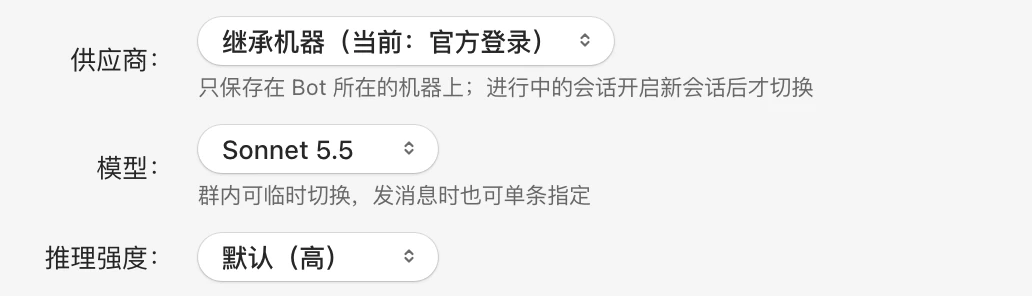
- Model: 「默认(…)」 (Default (…)) follows the Agent's default model; you can also pick one of the models reported by the machine. With a third-party provider, the list shows that provider's models.
- Reasoning effort: Offered by some models; options vary by model, such as 「低」 (Low), 「中」 (Medium), 「高」 (High), 「超高」 (Extra high), 「最高」 (Max). 「默认(…)」 (Default (…)) is the model's starting level. When you switch models and the new model lacks the previous level, it reverts to default.
If the machine hasn't reported available models yet, it shows 「跟随默认 · 机器上报可选模型后可设置」 ("follows default · can be set once the machine reports available models").
What you set here is the Bot's default. The effective value, from highest to lowest priority:
- A per-message override set below the input box when sending;
- The group's default;
- The Bot's default (here);
- The Agent's own default.
For switching within a group and per-message overrides, see Directing Bots in a group.
Other information
Bot details also show the number of groups it's in, the agent version, usage over the last 7 days, and a breakdown of who used it. If the machine's CLI version is below what the adapter requires, a 「agent 版本低于适配器要求」 ("agent version below adapter requirement") notice appears at the top; upgrade it under Agent tools.
Delete a Bot
Click 「删除 Bot」 (Delete Bot) in the bottom-left of Bot details and confirm with 「删除」 (Delete):
- The Bot is removed from all its groups;
- Group messages and run records are kept;
- Deletion can't be undone.