
Bots and groups
This page covers the admin console's 「Bot」 and 「群」 (Groups) pages: viewing all Bots and groups in the system, creating Bots for members, and modifying or deleting Bots.
Bot
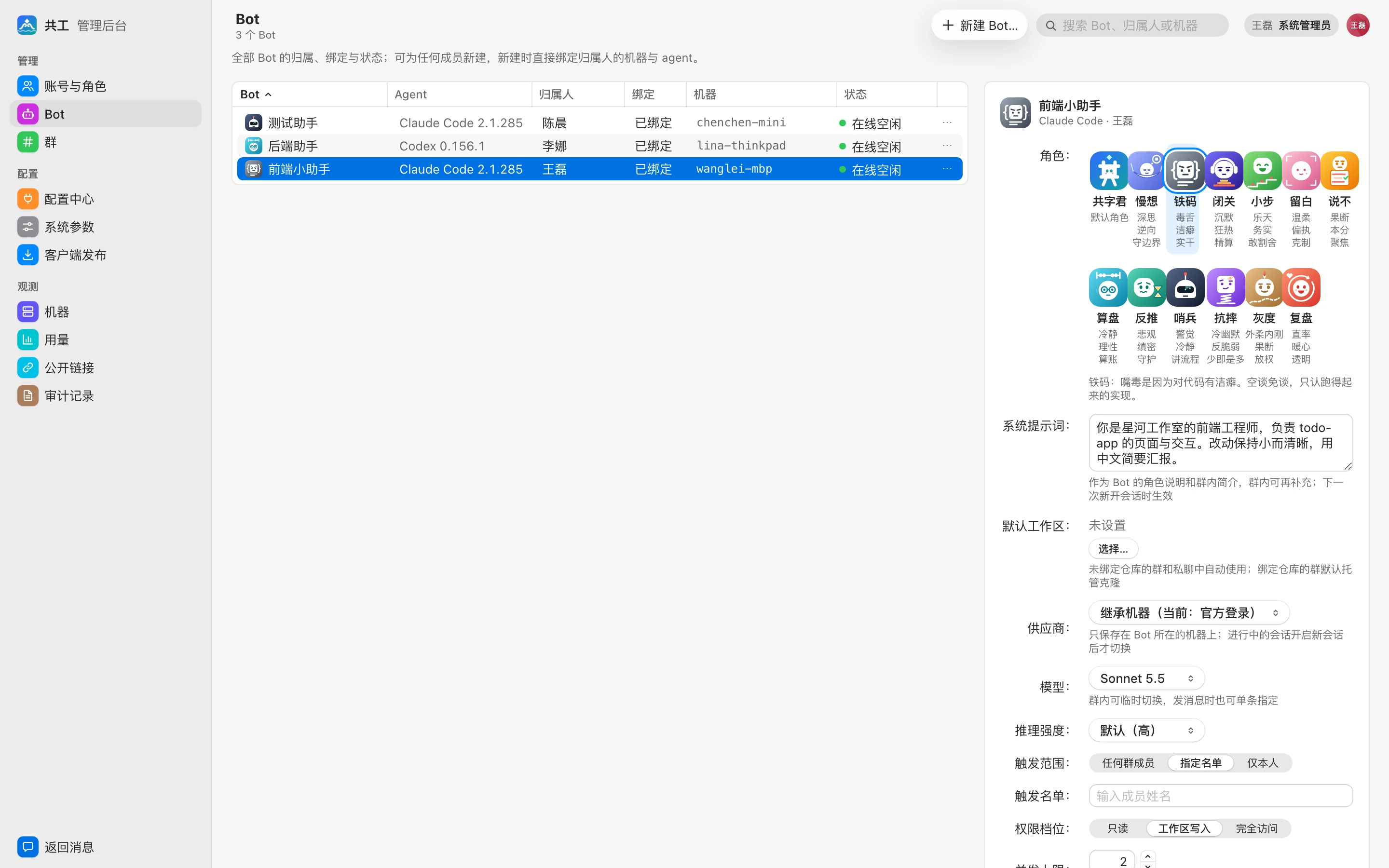
The 「Bot」 page lists every Bot in the system, with a table on the left and details of the selected Bot on the right. Use the search box in the top right to filter by Bot name, owner, or machine.
Table columns
| Column | Description |
|---|---|
| Bot | Avatar and name |
| Agent | The Agent used (Claude Code / Codex) and the version reported by the machine |
| 归属人 (Owner) | The Bot owner, who is responsible for what happens on that machine |
| 绑定 (Binding) | 「已绑定」 (Bound), or an orange tag 「待确认」 (Pending confirmation) or 「待绑定」 (Pending binding) |
| 机器 (Machine) | The machine the Bot runs on |
| 状态 (Status) | 在线空闲 (Online, idle) / 运行中 (Running) / 离线 (Offline) / agent 缺失 (Agent missing) / 不可触发 (Can't be triggered) |
「不可触发」 (Can't be triggered) means binding isn't complete yet:
- 待确认 (Pending confirmation): An admin created the Bot for someone else and bound it to that person's machine. The machine owner must confirm it in a web notification or in the Bot's details before it can be triggered.
- 待绑定 (Pending binding): The owner hasn't bound a machine yet. Once the owner binds their first machine and it reports the corresponding Agent, the Bot is bound automatically with no further action.
Create a Bot for a member
Sysadmins can create Bots for any member; members can create Bots only for themselves.
- Click 「新建 Bot…」 (New Bot…) in the toolbar.
- Choose, in order:
- 归属人 (Owner): Who the Bot belongs to.
- 执行机器 (Execution machine): A machine owned by the owner (shown with its OS and online status). If the owner has no machine yet, you can leave this empty and the Bot enters 「待绑定」 (Pending binding).
- Agent: Claude Code or Codex, shown with the version reported by that machine or 「未安装」 (Not installed).
- 名称 (Name), 角色 (Character) (personality avatar), 系统提示词 (System prompt) (also used as the Bot's intro in groups), and 默认工作区 (Default workspace) (optional).
- The bottom of the dialog previews the result, and the button label changes accordingly:
| Situation | Button | Result |
|---|---|---|
| Creating for yourself with a machine selected | 创建并绑定 (Create and bind) | Usable immediately after creation |
| Creating for someone else with a machine selected | 创建并发送确认 (Create and send confirmation) | Enters 「待确认」 (Pending confirmation); the other person gets a confirmation notification |
| No machine selected | 创建 (Create) | Enters 「待绑定」 (Pending binding) |
If the selected machine hasn't reported the chosen Agent, you'll see 「绑定后暂不可用」 ("Unavailable after binding for now"). Once the Agent is installed on that machine and re-detected, the Bot becomes usable automatically; see Agent tools and providers.
Modify a Bot
After selecting a row, you can edit the character, system prompt, default workspace, provider, model and reasoning effort, trigger scope, trigger list, permission tier, and concurrency limit directly in the details panel on the right. Click 「保存」 (Save) to apply (changes take effect the next time a new session starts). The details also show the number of groups the Bot is in, the agent version, usage over the last 7 days, and 「谁用了」 (Who used it).
For what each setting means, see Bot settings and permissions.
WARNING
The 「完全访问」 (Full access) tier only allows triggering by 「指定名单」 (a specified list). Command approval and the allowlist can be changed only by the Bot owner; admins can see them in the details but can't change them.
Delete a Bot
Choose 「删除 Bot…」 (Delete Bot…) from the row's menu. Deletion can't be undone. The Bot is removed from its groups; group messages and run records are kept.
Creating, modifying, and deleting Bots for others are all written to the audit log.
Groups
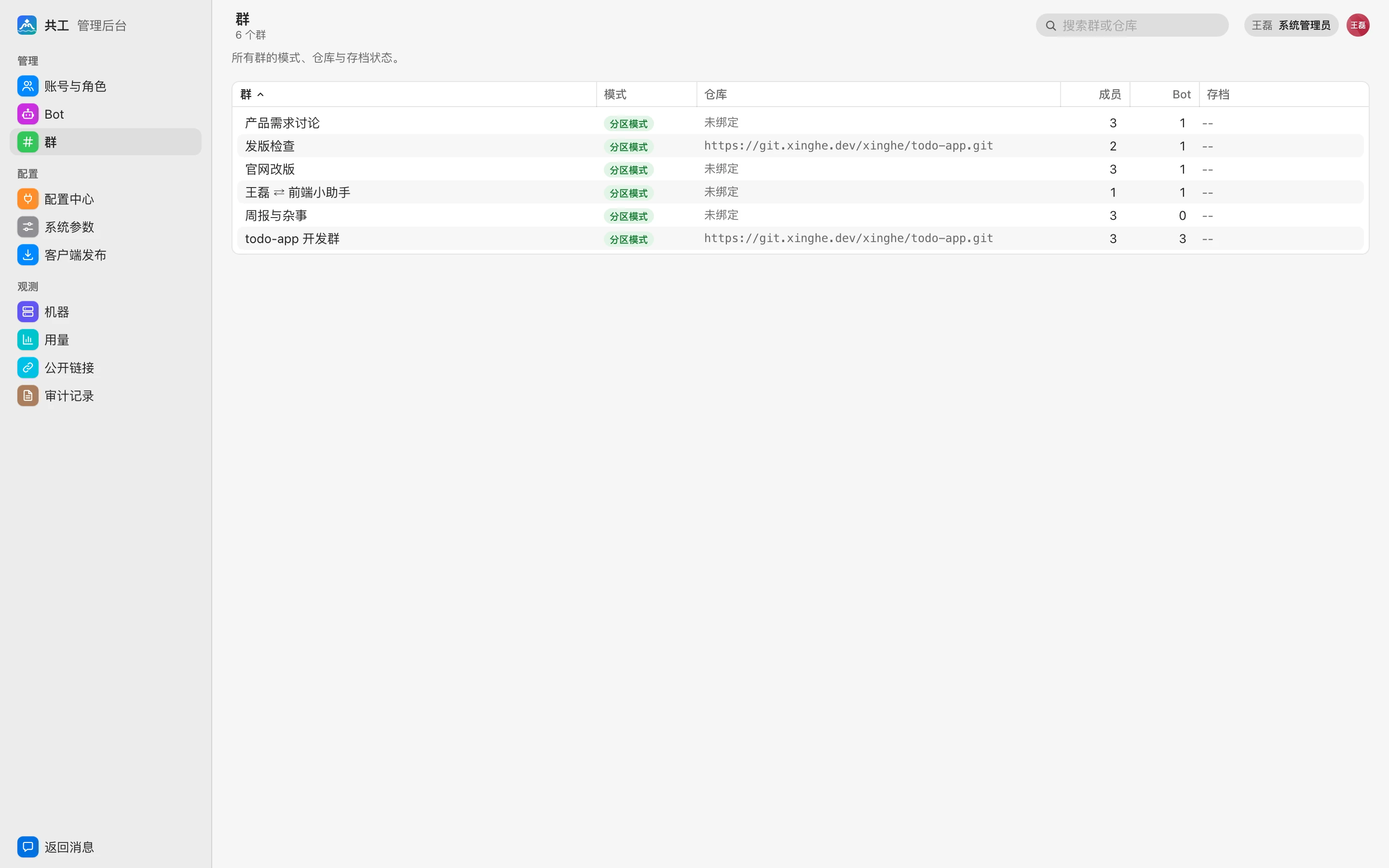
The 「群」 (Groups) page is read-only. It lists every group (including direct chats and groups that were disbanded and archived), and you can search by group name or repository URL.
| Column | Description |
|---|---|
| 群 (Group) | Group name; direct chats show as 「成员 ⇄ Bot」 (member ⇄ Bot) |
| 模式 (Mode) | 「分区模式」 (Partition mode); disbanded groups show 「已归档」 (Archived) |
| 仓库 (Repository) | The bound Git repository URL; shows 「未绑定」 (Not bound) if none |
| 成员 (Members) | Number of group members |
| Bot | Number of Bots in the group |
| 存档 (Archive) | Disbanded groups show 「归档 · N 天后清除」 (Archived · purged in N days), where N is based on 「删群后存档保留」 (Archive retention after group deletion) in System parameters |
Day-to-day group management (renaming, announcements, adding and removing members and Bots, changing the repository, group-level parameters, disbanding) is done by group admins in group settings; see Groups and direct chats and Repositories and workspaces.