
Machines
This page covers the 「机器」 (Machines) page: viewing the OS, version, online status, and network quality of every member machine, and how to revoke a machine.
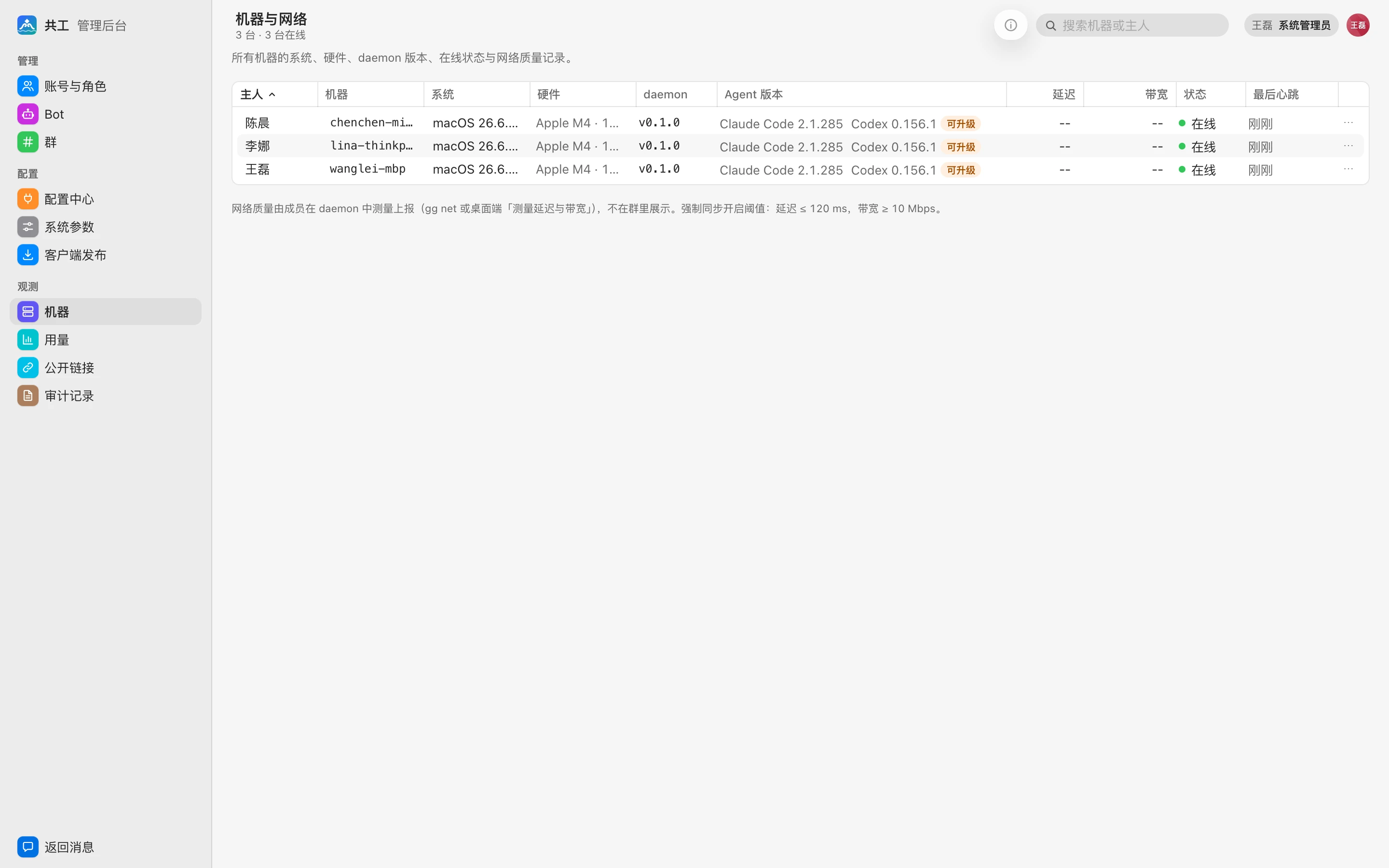
Machine list
The page title is 「机器与网络」 (Machines & network). The toolbar shows 「N 台 · M 台在线」 (N machines · M online), and the list refreshes automatically every 15 seconds. Use the search box in the top right to filter by machine name, hostname, or owner.
| Column | Description |
|---|---|
| 主人 (Owner) | The member the machine belongs to |
| 机器 (Machine) | Machine name (the hostname unless renamed; hover to see the hostname) |
| 系统 (OS) | Operating system and version |
| 硬件 (Hardware) | CPU model, core count, memory |
| daemon | daemon version. Versions with an outdated protocol are highlighted in a warning color |
| Agent 版本 (Agent version) | Claude Code / Codex versions available on the machine; shows 「可升级」 (Upgradable) when a newer version exists. Hover to see the latest version and whether it's 「共工空间托管」 (managed by Gonggong Space) or 「自行安装」 (self-installed) |
| 延迟 / 带宽 (Latency / bandwidth) | Latest network measurement; hover to see when it was measured |
| 状态 (Status) | 在线 (Online) / 离线 (Offline) |
| 最后心跳 (Last heartbeat) | 「刚刚」 (Just now) when online; how long ago when offline; 「从未连接」 (Never connected) if it has never connected |
Revoked machines don't appear in the list.
Network quality
Members measure latency and bandwidth on their own machines and report them: run gg net on the command line, or click 「测量延迟与带宽」 (Measure latency and bandwidth) in the desktop app. Results are shown only here, never in groups.
Machines whose latency is above, or bandwidth below, the two 「开启强制同步」 (Enable forced sync) thresholds in System parameters are marked in red with a warning icon, so you can spot machines with poor networks.
Outdated protocol warning
When a daemon's protocol version is lower than the server's, the server refuses its connection, and a yellow notice 「N 台 daemon 协议版本过旧」 ("N daemons have an outdated protocol version") appears at the bottom of the page, listing the machine names and versions. To fix it:
- Upload a new version in Client releases. Daemons that can download the new version upgrade automatically right away.
- On machines with auto-upgrade turned off or without write permission, the member needs to replace
ggmanually; see Installation.
Machine details
Double-click a row, or select it and click 「机器详情…」 (Machine details…) in the toolbar, to open the machine details: system info, online status, and the Bots running on it. Sysadmins can rename or revoke the machine here.
TIP
「Agent 工具」 (Agent tools) and 「供应商」 (Providers) can be managed only by the machine owner; admins can't install tools or change providers on their behalf. Provider keys, URLs, and the like are stored only locally on the member's machine and never on the server. See Agent tools and providers.
Revoke a machine
If a machine is lost, a member leaves, or you suspect a token has leaked, you can revoke the machine:
- Choose 「吊销机器…」 (Revoke machine…) from the row's menu.
- In the confirmation dialog 「要吊销机器 xxx 吗?」 ("Revoke machine xxx?"), click 「吊销」 (Revoke).
After revocation:
- The machine's daemon disconnects immediately and its token is invalidated.
- The daemon cleans up the managed workspaces on that machine; directories specified with
/cdand backups are kept. - To use the machine again, the member must generate a new bind code and run
gg login.
Revocation is written to the audit log. To disconnect all of a member's machines and sessions at once, deactivate the account instead.